Wednesday, January 11, 2017
Use Facebook On Slow Internet
Use Facebook On Slow Internet
Use Facebook On Slow Internet
Salam from Mohammed faizan
Facebook has many versions.These are Web Version , Basic Mobile Version And Android Facebook Version.( These Versions Are named by me only :p And Facebook has never discussed about these ever )
Now Coming back to my main point "Use Facebook On Slow Internet Easily "
To use Facebook easily on slow net you can open the mobile versions of Facebook that are:
Mobile versions:
1.Android Version
Android version of Facebook show Facebook on PC Like it is on android phone and use less data and is quite fast.Using Facebook in Android version is quite easy and relax able as you are provided with a sidebar ,by which you can find your favorites , groups , pages easily !
To Open Android Version Of Facebook head Over To:


2.Basic Mobile Version
This Version Of Facebook Is the lightest version.! This version is found in Symbian phones.Using Facebook on this version is sightly non-relax able as you have to go to separate page of your groups , pages to find your groups , pages etc . I found this version of Facebook when my computer was attacked by virus and i took my old computer and started it , that computer was having windows XP With Internet explorer 6 .I opened Facebook and it was not opening fully and internet explorer was saying to update itself.I incident opened mobile version (https://m.facebook.com) of Facebook on Internet explorer 6 and it redirect me to basic Facebook Version .To use basic mobile Facebook head over to :-

So, According to me i must prefer Android Version As best Version.
Enjoy on Slow Internet FB....

Go to link Download

Wednesday, December 28, 2016
Wall Street still worrying over netbook impact on Microsofts Windows 7 sales
Wall Street still worrying over netbook impact on Microsofts Windows 7 sales
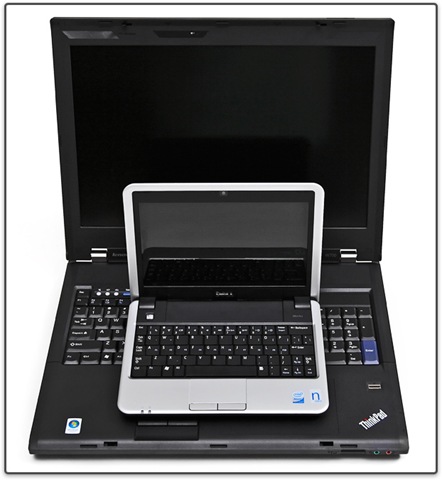
How much will netbooks dent Microsoft’s Windows sales?
It’s a question that continues to preoccupy many a Wall Street analyst, especially as Microsoft marches toward the October 22 launch of Windows 7. No matter how many times Microsoft officials claim that they believe the company will be able to charge premium prices for Windows 7, even on netbooks, Microsoft watchers ask again about just how elastic Windows’ pricing really can be, given that netbooks go for a few hundred dollars.
On September 9, the netbook question arose again during a question and answer session with Microsoft Chief Financial Officer Chris Liddell at the Citi Annual Global Technology Conference. Analysts asked Liddell the same-old: When Bing will actually give Google a run for its money; whether Microsoft would be able to continue to control costs; whether and when Microsoft will do stock buybacks (yes and in the coming months, Liddell said).
But analysts seemed most interested in the netbook issue. How can Microsoft predict that the continued popularity of netbooks, which comprise a fifth of the portable PC market (according to a recent market study), isn’t going to force Microsoft to charge less per copy of Windows, rather than more?
As expected, Liddell didn’t share details about how much Microsoft is planning to charge PC makers per copy for Windows 7 Starter or Windows 7 Home Premium, the main two SKUs expected to show up on low-end netbooks. (Word is Microsoft charges about $15 per copy for XP on netbooks.) But he did share more about why he said he isn’t worried about potential price erosion with Windows 7.
First, Liddell said that he believes netbooks, as a category, are “maturing.” They aren’t topped out yet and, according to Microsoft’s calculations, represent about 10 percent to 15 percent of the overall PC market. But they are likely to grow a percentage point or two higher, at most, he told Citi conference attendees.
Secondly, Microsoft is planning to continue to offer PC makers the option of licensing Windows XP “for a period of time,” as well, he said. That could appease the makers of some of the lowest price-point netbooks, at least for the time being. (Microsoft has said that OEMs will be able to license XP Home edition through June 2010 or one year after general availability of Win7, which I’m assuming means October 2010.)
Liddell reiterated Microsoft’s claim that 92 percent to 93 percent of netbooks are now going out with Windows XP, not Linux, attached. He said that proves that people are willing to pay at retail a premium of $30 to $40 per copy for “the Windows experience,” even when offered an alternative that is free. He acknowledged Microsoft won’t ever get to the 100 percent preload “attach” with netbooks, but even in the bargain segment, there is a group of people willing to pay for the familiar Windows experience — especially those netbook users who care more about the small form-factor benefits than the cut-rate price tags.
How Microsoft thinks about the actual cost of Windows was the part of Liddell’s remarks I found most interesting.
While Microsoft charges multiple hundreds of dollars for a new copy of Windows, Liddell said the actual cost is $15. Here’s how he calculated that number: The average selling price for Windows (when figured across all versions) is $60 per copy, he said. The average user sticks with a particular version of Windows for four years. So the cost of Windows isn’t really $249 or even $99. It’s $60 divided by four, or $15 for a “one year experience.” And if you compare $15 to the cost of having to learn a new OS or port your apps to a new platform, Windows looks downright cheap, Liddell said.
Hmmm. I’m not really buying Liddell’s new math. It’ll be interesting to see if any company watchers are finally appeased by his netbook assurances. Are you?
Via : ZDNet
Go to link Download
Tuesday, December 20, 2016
Ubuntu 9 10 due on October 29
Ubuntu 9 10 due on October 29
 A new version of one of the most popular Linux distributions, Ubuntu, is due in less than a months time. The final stable version of Ubuntu 9.10 will be released on 29 October, according to their website. However, a beta for version 9.10 is available for those interested.
The new version features several changes, one of which is the use of the faster ext4 file system by default for new installations (although existing file systems will not be upgraded). In addition, the latest version of GNOME, version 2.28, is included with the beta. The "look and feel" of booting the system has also been improved.
GRUB 2 is now the default bootloader, however it does lack support for a few things such as password support. You can find the main improvements in Ubuntu 9.10 here. Naturally there are some issues with the beta, which you can find at the bottom of that page.
Whilst new versions are not usually special, the switch to the ext4 file system is a major step forward for Ubuntus aim to have a ten second boot time for 2010s release, as the file system offers improved performance compared to its predecessor.
For those who want a look before the final release on 29 October, the beta can be downloaded through the usual ways from here, however the beta is recommended for testing purposes only, and, of course, always make a full backup if you do use it.
Via : neowin.net
Go to link Download
Tips to Type Quicker on Windows Phone
Tips to Type Quicker on Windows Phone

Microsoft has worked hard to make it the most fluent and user-friendly keyboard around. By incorporating Word Flow, which learns from the way you type and predicts the words you’re likely to use, to the uniformity of how to find shortcuts, it’s a treat to use. What’s more, we’ve found it certainly works faster and more intuitively than rival keyboards on Android or iPhone.
The keyboard is great as it comes with a host of features that makes typing quick and easy, from predicative text to autofill features and even neat little tricks waiting to be discovered. What’s more, the more you use it the better it gets as the keyboard learns those words and phrases you use the most commonly and uses these as its suggestions.
Read more »
Go to link Download
Saturday, December 17, 2016
Whos On My WiFi 2 0 8 Portable
Whos On My WiFi 2 0 8 Portable

Are People On Your Network Right Now?If you’ve stumbled across this site, chances are that you’re concerned about how secure your wireless network really is. You might even be concerned that someone you don’t know is connected to your network this very minute.
The problem is you can’t see a wireless network. You can’t touch it. And you can’t know who is connected to it without some help.
But there is a way to be 100% certain that no one is on your Wireless Network but the computers and devices that you want to be on it…
It’s like they say “Trust but Verify”.
At this point, I hope you see the true value in verifying who has been connecting to your network.
I know when I first ran the software on my own machine, I kept expecting that someone I didn’t know would connect any minute.
I have to admit that I was pleasantly surprised.
I run WPA2 on my wireless network, and in the 6 months that I’ve been running this software, I’ve only seen 1 person connect to my network that I wasn’t aware of. And that was my wife who plugged her new computer directly into the Wireless Router without telling me about it.
For about the same price as a DVD or BluRay disc, you can have the piece of mind that your network is safe.
Download Links:
Download from UploaDed
Download from ExtaBit
Download from RapidGator
Go to link Download
Thursday, December 15, 2016
Windows 10 release date price features The next version of Windows will run on everything smartphones tablets laptops and PCs
Windows 10 release date price features The next version of Windows will run on everything smartphones tablets laptops and PCs


Windows 10: why is it called Windows 10?
Windows 10 price: A free update?
 Go to link Download
Sunday, December 11, 2016
USB Car Adapter Charges Any USB Device On the Go
USB Car Adapter Charges Any USB Device On the Go
 The iLuv Micro USB Car adapter turns your cars cigarette outlet into a universal USB charger, so you dont have to buy specialized car chargers for all of your USB-chargeable gear.
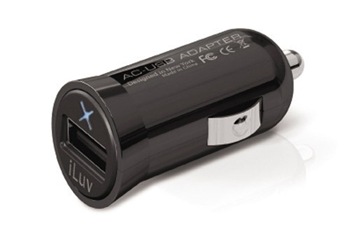
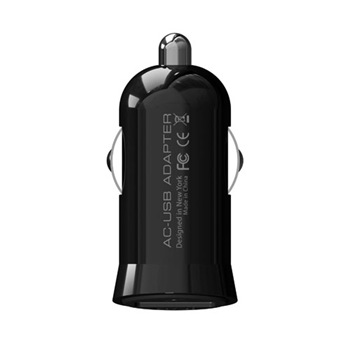
The device is tiny (1.7-inches long), so once plugged in only a small portion of the gadget will stick out from your dash, so it shouldnt be much of an eyesore. Then, rather than buying car chargers for your cell phone, your iPod, your camera, or whatever else youve got that can already charge via USB, you can just plug your cheap USB charging cable into the USB car adapter and call it good. The gadget will set you back $15, so its probably just as cheap (if not cheaper) than dedicated chargers. Its currently not available from the iLuv store, but its supposed to be sometime in September, meaning it should be available sometime in the next week.
Features
- Micro-size USB car adapter
- Blue power LED
- Quickly charge your iPhone / iPod or any other USB devices with car adapter
- Input: DC 12 - 24V
- Output: DC 5V, 500mA
- Price: $ 14.99
Via : iLuv
Go to link Download
Sunday, December 4, 2016
Turn on off Windows 8 Faster Startup
Turn on off Windows 8 Faster Startup
Windows Fast startup is a configuration setting that helps your computer start up faster after shutdown. Windows 8 does this by saving system information to a file upon shutdown. When you start your computer again, Windows uses that system information to resume your computer instead of restarting it.
Notes
•The faster startup configuration setting doesn’t apply to Restart. You need to shutdown and then start your computer again for Windows faster startup to take effect.
•Windows Faster startup is turned on by default in Windows.
The Faster Startup Checkbox option can be found at Power option System settings. Here’s how to access the option via a User Interface.
Go to your power option by clicking the Power Plug icon and then Click More power options. Or use your Run Window (Win+R) and type: control /name microsoft.poweroptions

Once inside the power option window, at the left pane click “Choose what the power buttons do”

System settings of power option window will be launch and you need to click or go for UAC verification inorder to edit the power settings: Change settings that are currently available as shown below

Control PanelHardware and SoundPower OptionsSystem Settings
At the bottom part, you’ll be able to enable and disable “Turn on fast startup” option

The Fast startup helps start your PC faster after shutdown. Restart is not affected.
Thanks for reading the optimization tip!
Go to link Download
Sunday, November 27, 2016
Top 10 Free Cloud Storage For Storing Data On internet
Top 10 Free Cloud Storage For Storing Data On internet


1. ADrive (50 GB)
Adrive offers maximum free storage of 50 GB. It is a free cloud storage provider which allows maximum file transfer size of 2 GB. You can upload a folder or directory and also edit your documents using Zoho docs.
2. Symform (10-200 GB)
Cloud storage provider Symform is special in the way it allots you free cloud storage space from 10 GB to 200 GB. You have to download Symform to use Symform cloud storage. Initially you get 10 GB of free cloud space. Then you can increase your cloud storage by adding local storage to Symform. More local storage you add more cloud storage you get. Maximum file upload size is unlimited.
3. Dropbox (2-10 GB)
Dropbox is a popular cloud storage service provider known for its ease of access and reliability. You can upload unlimited file size. Just install Dropbox app and you are good to go.
4. Skydrive (25 GB)
Skydrive is a cloud storage service from Microsoft. It comes with the all familiar Office suite to edit documents online. However maximum File upload size is really small limited to 100 MB. You need a Windows live id to log in and use Skydrive.
5. Google Drive (5 GB)
Well, it is from the house of Google so it has all too familiar and expected features. Google Drive has been launched just recently, making Google a serious cloud storage provider in the industry. Here’s what written on Official Google Blog:
” We’re introducing Google Drive—a place where you can create, share, collaborate, and keep all of your stuff. Whether you’re working with a friend on a joint research project, planning a wedding with your fiancé or tracking a budget with roommates, you can do it in Drive. You can upload and access all of your files, including videos, photos, Google Docs, PDFs and beyond. “
You can log in using your Gmail Account and also install Drive app on your device to have easy access to your data .
6. Amazon CloudDrive (5 -20GB)
Online shopping giant Amazon also offers a basic 5 GB of cloud storage space which can be increased to 20 GB simply by purchasing a mp3 album from amazon You can transfer 2 GB size files using Amazon Cloud service and also stream music to your connected devices.
7. Cloud Experience – CX (10-16 GB)
Cloud experience CX is free cloud storage provider which gives you 10 GB space to start with, which can be increased to 16 GB by referring your friends. There is no limit of maximum file transfer size and it gives you easy options to organize your content. You can make groups of friends and share files among them.
8. SugarSync (5 GB)
Store files, sync them as and when required even between shared spaces and access your files anywhere form all platforms i.e. mobile or desktop using Sugarsync cloud storage provider. Just download Sugarsync app and start storing files on cloud. You can send files of any size easily using Sugarsync.
9. Box.net (5 GB)
Box.net is a free cloud storage provider offering 5 GB of free cloud storage and up to 25 MB of free file transfer.
10. Ubuntu One (5 GB)
Ubuntu One is a free cloud storage provider effort from Ubuntu (popular Linux OS) team providing free 5 GB storage and free data sync service. It is easy to install and use and can be accessed easily from iPhone and Android apps.
Go to link Download
Monday, November 21, 2016
Trick to create Matrix Falling Code Effect on PC
Trick to create Matrix Falling Code Effect on PC
Matrix Falling Code Effect - Notepad CMD (.BAT) Tricks | ||
|---|---|---|
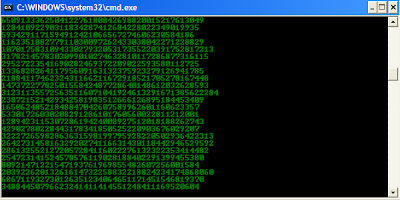
Inspired by the movie Matrix, this falling code trick is extremelypopular on social networking websites. Copy and paste the code given below inNotepad and save the file as "Matrix.bat" or *.bat. @echo off
Upon running the bat file, you will see the "Matrix falling code" effect. |
Go to link Download
Sunday, November 20, 2016
Where does Google Music store the “offline tracks” on Android
Where does Google Music store the “offline tracks” on Android
Question:
I have about 8 gigs of music stored within Google Music, and I recently got sick of streaming (and risking data charges), so I painstakingly allowed it to be stored offline. So my fresh 16 gig SD card now only had 8 gigs left. Then, I flashed a new rom, thinking that all my music would still be there cached (or however it works), but I was wrong. When I click "show offline tracks only" within the Google Music app, it shows nothing, yet my SD card still only has 8 gigs of space left.
So, my question is, where are these offline tracks stored on my SD card so I can go in and delete them, to free up space so I can back them all up again?
Thanks!
Answer

/sdcard/Android/data/com.google.android.music/cache/music

you can clean this folder out if you wish.
Go to link Download
Saturday, November 19, 2016
Virus that steals bank information is on the rise
Virus that steals bank information is on the rise
The BBC is reporting that Zues, a virus that steals your online bank account information is on the rise. Trusteer says of the 5.5 million computers that they monitor, one in 3,000 is infected with the Zues virus.
Zues 1.6 can infect users using both Internet Explorer and Firefox. Once infected the virus records your keystrokes when logging into your banks website. The data is then sent to a remote server where it is used or sold by the cyber gang.
"We expect this new version of Zeus to significantly increase fraud losses, since nearly 30% of internet users bank online with Firefox and the infection is growing faster than we have ever seen before," said Amit Klein, chief technology officer at Trusteer.
In March 2010, parts of the primary control center for the Zeus botnet were taken offline when the Kazakhstani ISP that was being used to administer it was cut off. Unfortunately, though, it is back on the rise as the hackers have started to expand their botnet.
via http://www.neowin.net/
Go to link Download
Thursday, November 17, 2016
Windows 7 Might Come on PCs Before October 22
Windows 7 Might Come on PCs Before October 22
![windows7_thumb[4]](http://lh5.ggpht.com/_oKWSFQK84Co/Ss9c_yDOw0I/AAAAAAAAA_Q/8tgC2Q3gBxs/windows7_thumb%5B4%5D_thumb%5B2%5D.jpg?imgmax=800 "windows7_thumb[4]")
Redmond-based software giant Microsoft will launch on the market its latest operating system for personal computers, Windows 7, on October 22, this is something that we are all aware of, yet it seems that some system builders say they will ship the platform on devices prior to that date. According to a recent article on TechFlash, October 13 is the lucky date for those eagerly awaiting for Windows 7 to become available on the market.
“I dont think Ive ever been more prepared for an operating system launch than I have been with Windows 7,” Jon Bach, president of Auburn-based Puget Systems Inc., reportedly stated. According to him, Microsoft has announced small system builders that it will enable them to sell Windows 7 PCs the same day they will receive product keys, no later than October 13.
On the other hand, Microsoft says that system builders wont be ready to ship their products before the official general availability date of the platform. They will need the Windows 7 OEM Preinstallation Kit (OPK), as well as other tools to pre-load the client on new computers, and this is something they do not have at the moment, ZDNet reports. However, said system builder points at October 13, though it seems that it wont get to ship the PCs before October 22.
“October 12 is the date that Microsoft enables our Authorized Replicators to begin shipping Windows 7 to Microsoft OEM Authorized Distributors. As the fulfillment process through our supply chain takes time, we begin initial product distribution in advance of General Availability. Therefore, this represents our Release To Manufacturing (RTM) process for OEMs who purchase indirectly through Distribution,” is what a Microsoft spokesperson stated, adding that, “while in theory a System Builder could get Windows 7 product pre-GA, based on supply chain analysis, the intended timing for customers to receive Windows 7 PCs from System Builders should be close to GA, October 22nd. This represents the same process Microsoft managed with past Windows releases.”
The idea is that system builders will get their Windows 7 final bits from Microsoft’s authorized distributors, which, in turn, should get the OEM software from Authorized Replicators. While large computer vendors around the world receive their Windows 7 bits from Microsoft directly, system builders have to get through a longer supply chain for that, which suggests that PCs pre-loaded with the OS might not arrive on the market prior to October 22 after all.
Via : SOFTPEDIA
Go to link Download
Tuesday, November 15, 2016
WATCH FREE LIVE TV ON VLC PLAYER
WATCH FREE LIVE TV ON VLC PLAYER
WATCH FREE LIVE TV ON VLC PLAYER
WATCH FREE LIVE TV ON VLC PLAYERWatch Live TV on Your PC For Free just using a VLC playerTo Do This Just Follow These Simple Steps
First of all you need to have VLC player, if you don’t have vlc player kindly download and install it. Downlod hereNow open Vlc Player, and select streaming option from the media menu present in the menu bar.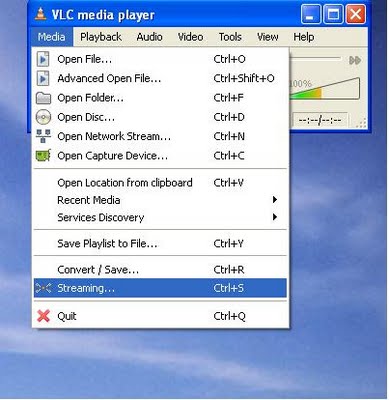 Select network option and enter the url of the streaming channel. For example if you want to view B4u Music you need to add urlrtsp://217.146.95.166:554/playlist/ch12zqcif.3gp
in the url field and then select play option from the stream drop down menu.  After you click play in the above step, the channel will start streaming and you can watch your favorite channels
 Now Take This Example Of Ajj Takk On My Desk..
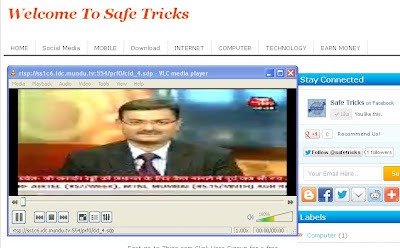 Here is the List of many other channels which you will love to watch
Channel Name Link
NDTV rtsp://ss1c6.idc.mundu.tv:554/prf0/cid_33.sdpNDTV Profit rtsp://ss1c6.idc.mundu.tv:554/prf0/cid_31.sdp
Times Now rtsp://ss1c6.idc.mundu.tv:554/prf0/cid_2.sdp
Aaj Tak rtsp://ss1c6.idc.mundu.tv:554/prf0/cid_4.sdp
CNBC Aawaz rtsp://ss1c6.idc.mundu.tv:554/prf1/cid_34.sdp
CNBC TV 18 rtsp://ss1c6.idc.mundu.tv:554/prf0/cid_35.sdp
Headlines Today rtsp://ss1c6.idc.mundu.tv:554/prf0/cid_7.sdp
NDTV 24×7 rtsp://ss1c6.idc.mundu.tv:554/prf0/cid_29.sdp
NK News rtsp://94.75.250.53:554/rtplive/rknews.sdp
RAJ News rtsp://94.75.250.220:1935/live/rajnews2.sdp
ETV rtsp://94.75.250.53/rtplive/etv2low.sdp
Studio N rtsp://94.75.250.220:1935/live/studion2
SVBC rtsp://94.75.250.220/rtplive/svbclow
Zoo Vision rtsp://stream.zoovision.com/live.sdp
B4u Music rtsp://217.146.95.166:554/playlist/ch12zqcif.3gp
iMusic rtsp://217.146.95.166:554/playlist/ch26yqcif.3gp
Zee Tamil rtsp://121.244.145.226:554/prf1/cid_54.sdp
Zee Kannad rtsp://121.244.145.226:554/prf1/cid_55.sdp
Zee Bangla rtsp://121.244.145.226:554/prf1/cid_52.sdp
Music Box rtsp://stream.the.sk/live/musicbox/musicbox-3m.3gp
Bella Tv rtsp://217.146.95.166:554/playlist/ch29yqcif.3gp
Fashion Tv rtsp://217.146.95.166:554/playlist/ch27yqcif.3gp
Adventure rtsp://video3.multicasttech.com/AFTVAdventure3GPP296.sdp
Horror rtsp://video2.multicasttech.com/AFTVHorror3GPP296.sdp
Comedy rtsp://video3.multicasttech.com/AFTVComedy3GPP96.sdp
Classic rtsp://video3.multicasttech.com/AFTVClassics3GPP296.sdp
Crime rtsp://video2.multicasttech.com/AFTVCrime3GPP296.sdp
Mystery rtsp://video2.multicasttech.com/AFTVMystery3GPP296.sdp
Clubbing Tv rtsp://217.146.95.166:554/playlist/ch21yqcif.3gp
Sab Tv rtsp://59.162.166.216:554/SABTV_QVGA.sdp
Sony Tv rtsp://59.162.166.216:554/SONYTV_QVGA.sdp
Zoom Music rtsp://115.248.246.156:554/ZOOM_QVGA.sdp
Animal Planet r
Go to link Download
First of all you need to have VLC player, if you don’t have vlc player kindly download and install it. Downlod here
in the url field and then select play option from the stream drop down menu.