Friday, July 28, 2017
Unknown Device Solutions
Unknown Device Solutions
INTRODUCTION:
Base on my experience troubleshooting computers, sometimes the computer system (windows) unable to detect the hardware changes whenever we plug in storage (like thumb drive, memory card, etc). Or after installing all drivers there are still driver missing which listed as "unknown device" in device manager.
So here i would like to share my experience how to solve this problem because there are many reason why your computers get the unknown device problem.
IF you have the error and prompt with " Disk management console view is not up to date" whenever you insert memory card or usb drive you can refer my tutorial here:
http://laptop-driver.blogspot.com/2010/12/disk-management-console-view-is-not-up.html
CONTENT:
1. Unknown device - in device manager
Devices that detected as unknown device after installing windows.
2. Unknown device - USB storage and New Hardware
Unknown device appear after inserting USB storage such as thumdrive into the USB slot or other computer port.
Note: to open device manager click START and on the serach box type DEVMGMT.MSC and press ENTER. In windows 8 right click on lower left corner at the power user start button and select device manager.
1 - UNKNOWN DEVICE - IN DEVICE MANAGER
You will see picture like this.

The solution is step by step process, which is say A didnt work, so move to solution B.
If you didnt find unknown device and theres no hardware detected after insert the USB device into the USB slot, click VIEW in device manager and select SHOW HIDDEN DEVICE.
1A: INSTALL AND UNISTALL
1. Right click on the unknown device. Select uninstall. It will disappear from the list.
2. Right lcik again on any device there and select scan for hardware changes.
3. A new hardware found displayed and select automatically install driver.
1B: IDENTIFYING THE UNKNOWN DEVICE AND GET THE APPROPRIATE DRIVER.
1. To identify what is the unknown device, first we must get the hardware ID.
2. To get the hardware ID you can read my tutorial here:
http://laptop-driver.blogspot.com/2009/12/how-to-check-hardware-id.html
3. After you get the hardware ID refer to the list below:
ACPIHPQ0006
ACPIHPQ0007
HP Quicklaunch Button : Download link - SP45058
ACPI/HPQ0004
HP Hard Driver Smart Protection Download link - SP45501
ACPIENE0100
ENE CIR Reciever (Infrared) Download link - sp45308
ACPIAWY00012&DABA3FF&0
Away Mode Driver Download link - http://www.nvidia.com/object/nforce_winxp_15.26.ht
or: http://data.versiontracker.com/drivers/manual/msi/
ACPIVEN_HPQ&DEV_6001
HP Wireless Button Driver : Download link : sp58720
If you cannot enable f12 function use this driver: sp59199
ACPIIFX0102
Ifineon trusted module: Download link
USBVID_138A&PID_003D&REV_0104
Validity Fingerprint sensor driver : Download link
My hardware ID is not listed here, what to do?
-post your hardware ID here and i will recommend the compatible driver for you.
Another trick: Google the hardware ID and you will get the information about the device and drivers.
2. USB STORAGE AND NEW HARDWARE.
This section will discuss the problem with USB drive such as thumb drive and memory card which detected as unknow device.
SECTION 2A:
1. First thing to do is similar with previous post section 1A.
2. Try to plug the USB into other port.
3. If still didnt work try the USB on other computer, if still detected as unknow means there are problem with the hardware. It may refer to faulty hardware.
4. If it work on other computer and not yours, maybe you are missing USB driver/OS patch/upgrade/fix which you can download from your computer manufacture site.
SECTION 2B:
1. Open drive management by click start and type DRVMGMT.MSC and press ENTER.
2. Look at the drive listed and see if the disk is detected. If not means there are problem your your hardware. Test it with other computer and if detected on other computer you must try with different usb slot on your computer.
3. For memory card make sure you computer can support the size of the card, example some computer only can read up to 2GB memory reader, and unable to detect or read higher than that.
4. Malware and virus maybe one of the cause but it never happen to me and no report from users about this.
EXPERT MODE:
Generally speaking, people who like computers love to try anything to fix and test.
I always have multiple OS in my computers and normally if i have problem with USB detected as unknown i will test it on Ubuntu or other linux distribution such as linux mint. (I always change my linux OS). If you have Mac OS it will not detect storage in FAT and NTFS.
If my linux can read it, i backup the file and reformat the USB. So far there is only 2 result i got, if it detected reformat than when i plug in windows OS no more unknown and the USB work perfectly. If it not detected in LINUX mean it is hardware Faulty.
If you have suggestion to improve this post Im really happy to hear it.
Comments and feedback are most welcome.
Go to link Download

Sunday, December 11, 2016
USB Car Adapter Charges Any USB Device On the Go
USB Car Adapter Charges Any USB Device On the Go
 The iLuv Micro USB Car adapter turns your cars cigarette outlet into a universal USB charger, so you dont have to buy specialized car chargers for all of your USB-chargeable gear.
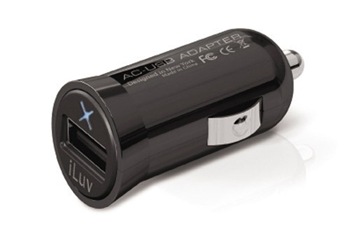
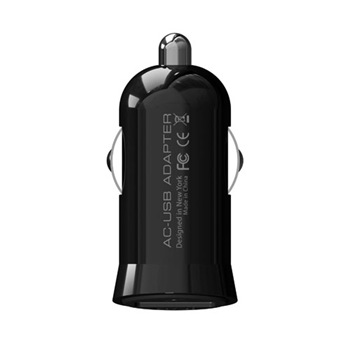
The device is tiny (1.7-inches long), so once plugged in only a small portion of the gadget will stick out from your dash, so it shouldnt be much of an eyesore. Then, rather than buying car chargers for your cell phone, your iPod, your camera, or whatever else youve got that can already charge via USB, you can just plug your cheap USB charging cable into the USB car adapter and call it good. The gadget will set you back $15, so its probably just as cheap (if not cheaper) than dedicated chargers. Its currently not available from the iLuv store, but its supposed to be sometime in September, meaning it should be available sometime in the next week.
Features
- Micro-size USB car adapter
- Blue power LED
- Quickly charge your iPhone / iPod or any other USB devices with car adapter
- Input: DC 12 - 24V
- Output: DC 5V, 500mA
- Price: $ 14.99
Via : iLuv
Go to link Download