Showing posts with label wifi. Show all posts
Showing posts with label wifi. Show all posts
Wednesday, January 18, 2017
Top 10 WiFi Passwords Breaker For Android Apps In 2016
Top 10 WiFi Passwords Breaker For Android Apps In 2016
 |
| Top 10 WiFi Password Hacker For Android Free Download |
Hack WiFi Passwords
1. WEP Wifi Password Finder
2. WiFi Hacker PRANK
3. WiFi Hacker (bgn)
4. WifiPassword
WEP Wifi Password Finder is an application help you hacking all WiFi network doesn’t matter how strong their passwords or encryption network they has. It makes clear all WiFi passwords in just a few minutes shown you. Yep, you got it right that the WiFi network connection and WiFi finding a wifi network also can be come true by using this simple free application “WEP Wifi Password Finder”.
Download WEP Wifi Password Finder .apk
2. WiFi Hacker PRANK
WiFi Hacker PRANK is an ideal app that gradually makes a black-door in the WiFi device and gain the access to WiFi networks and you show you the cracked passwords. It’s very easy to use, it let’s you access the unknown WiFi network or if your iPhone found a network and you really need to know the password. I must say that this app will help you a lot in case finding the password of that device. In a few short steps an automated script in the app will reveal the password immediately.
Download WiFi Hacker PRANK .apk
3. WiFi Hacker (bgn)
WiFi Hacker Prank (bgn) the best app to hack a WiFi device password. In the first step take your Android phone to your friend’s home and start WiFi Hacker app at the moment. They will really believe that you are hacking their WiFi networks key! This would be fun for you when you watch the reactions on their face.
Dwonload WiFi Hacker Prank (bgn) .apk
4. WifiPassword
WifiPassword is an android app which pretend to crack the WiFi networks. This can penetrate all WiFi networks that you mobile observe like a Gamma ray. This will hack every router near you, gain their passwords and then you will be able to use Internet by using these passwords. Prank your friends that you’re a dangerous Hacker.
Dwonload WifiPassword .apk
5. Wifi Hack Pass Premium
7. WIFI Hacker by Hannes Runge
8. Free WiFi Passwords
Free WiFi Passwords is the best app for your android, and let’s you give you information about all the nearest WiFi spots – for both free and secured. Free WiFi android app make it easy for you to use internet wherever you may be by searching the most nearest WiFi devices.
How does it work?
10. WiFi Hack (Fake)
WiFi Hack (Fake) for Android let’s you access the local WiFi networks by hacking their passwords. This enable you to connect with any WiFi network within your range and take advantages of internet anywhere you go.
The Wifi Hack Pass Premium is the best Hacker for Android. This app will help you to break/crack the WiFi passwords immediately just after installing this app into your phone. It is a tool that analyzes the WiFi networks around you. Any wireless network that has a security hole will be detected. This is not actually the app to hack the WiFi passwords, it’s just an app to have fun and prank your friends.
Download Wifi Hack Pass Premium .apk
6. WiFi Hacker
WiFi Hacker is especially hack WiFi password to wireless networks. This is android app is the best WiFi password hacking tool. A person will be able crack and hack WiFi networks easily. Did you forget password to your own WiFi router? Hack it using your iPhone :). This app is for your own router and network hack. Please, don’t hack your friends WiFi that’s not yours. It’s only to retrieve your own password of WiFi.
Download WiFi Hacker .apk
PRANK YOUR FRIENDS, using this WiFi Password Recovery Android app. It is an awesome WIFI Hacker application in Google Play Market! This app let’s you enable to crack any WIFI network around you!
Download WiFi Password Recovery .apk
8. Free WiFi Passwords
Free WiFi Passwords is the best app for your android, and let’s you give you information about all the nearest WiFi spots – for both free and secured. Free WiFi android app make it easy for you to use internet wherever you may be by searching the most nearest WiFi devices.
How does it work?
- Start application, choose your location and search for WiFi
- The application will scan all found networks and filter out those with their available passwords or no passwords at all (the all passwords will be user shared and no hacking process involved yet privacy)
- Choose your WiFi and start browsing
Download Free WiFi Passwords .apk
9. Wifi passwordWifi password is the Android’s fastest and advanced application that helps you to hack nearest Wi-fi connections. Hack into anybody private router! Hacking a wireless have never been easier as it is now-a-days with the increment in technology.
Download Wifi password .apk
10. WiFi Hack (Fake)
WiFi Hack (Fake) for Android let’s you access the local WiFi networks by hacking their passwords. This enable you to connect with any WiFi network within your range and take advantages of internet anywhere you go.
Download WiFi Hack (Fake) .apk
Go to link Download

Saturday, January 14, 2017
Virtual WiFi Router 2 0 1 5 WiFi from your computer
Virtual WiFi Router 2 0 1 5 WiFi from your computer

Virtual WiFi Router 2.0.1.5 Turn your PC into a WiFi access
"Turn your PC into a WiFi access point"
You are connected to the Internet via a modem and want to share it with other nearby equipment if the signal, using virtual WiFi router for your wireless network card distribution work or warm place to be repeated.
Virtual WiFi router is very easy to configure, but first check the box that allows you to connect with other users, go to the Properties tab of your local area connection and sharing.
Once your link, you and I share a virtual WiFi router and other computers or mobile phones to access the Internet via a modem and choose a username and password ready.
You can use the Internet via a 3G modem for computers and want others to enjoy the same wireless network as a virtual WiFi router is the main application. Very simple to configure and easy to encrypt data transmitted without wasting resources
Configuring First Time
Instructions to start using it
For now we are releasing for only windows 7.
If you dont have. Net framework installed on your machine, enable Microsoft. Net from "Turn on Windows Feature On or Off" option, To do that Open Control Panel and follw the following steps to enable it.
Press "Programs" or "Programs and Features"
____________________________________
Error "please enable your wifi adapter"
Dear Users,
You may get this error in the following scenarios
When your wifi is turned off
When your drivers dosent support virtualization. So please try to find the latest drivers which can support virtualization

HOW TO DOWNLOAD SOFTWARE ??
click download >>Wait 5 Sec -> Click [Skip] TWO TIMES

Go to link Download
Saturday, December 17, 2016
Whos On My WiFi 2 0 8 Portable
Whos On My WiFi 2 0 8 Portable

Are People On Your Network Right Now?If you’ve stumbled across this site, chances are that you’re concerned about how secure your wireless network really is. You might even be concerned that someone you don’t know is connected to your network this very minute.
The problem is you can’t see a wireless network. You can’t touch it. And you can’t know who is connected to it without some help.
But there is a way to be 100% certain that no one is on your Wireless Network but the computers and devices that you want to be on it…
It’s like they say “Trust but Verify”.
At this point, I hope you see the true value in verifying who has been connecting to your network.
I know when I first ran the software on my own machine, I kept expecting that someone I didn’t know would connect any minute.
I have to admit that I was pleasantly surprised.
I run WPA2 on my wireless network, and in the 6 months that I’ve been running this software, I’ve only seen 1 person connect to my network that I wasn’t aware of. And that was my wife who plugged her new computer directly into the Wireless Router without telling me about it.
For about the same price as a DVD or BluRay disc, you can have the piece of mind that your network is safe.
Download Links:
Download from UploaDed
Download from ExtaBit
Download from RapidGator
Go to link Download
Sunday, December 4, 2016
Wifi Password 1 1 0 apk Free Download
Wifi Password 1 1 0 apk Free Download
 |
| Wifi Password 1.1.0 Apk |
You are downloading WiFi Password 1.1.0 .apk file for your Android device and in order to download you have provided a direct download link and a Google play link below on which you can simply click and download the .apk file of WiFi password 1.1.0 .apk file. WiFi password 1.1.0 Android app allows Android users to crack the WiFi network to recover your WiFi default password.
Download WiFi password 1.1.0 .apk
- Download APK from Google Drive
- Download from Google Play Store
Go to link Download
Saturday, December 3, 2016
WiFi SiStr v1 0 2678 17860
WiFi SiStr v1 0 2678 17860

Here´s a small and complete tool to keep your Wi-Fi signal strength always visible.
Features:
- Multi-Language (17)
- Easy to use and understand
- Small display fully customizable (Colors, opacity, size and value display)
- Pre-defined and user defined themes
- Windowless
- Magnets "like" behaviour
- Move by left button drag-n-drop
- Very complete htm Help included (1.60MB - English only - PDF version available on the website)
- Settings by right-click on the main display
Extended fully customizable options:
- Signal strength customizable logs
- Statistics and averages display
- Customizable sounds alerts on low signals
- Download/Import/Export user themes options
- Downloaded/Exported User themes previewer
- System tray minimize when not needed
Latest version includes a lot of new features.
See all details/changes/requirements and install/uninstall process on http://www.dnsoft.be/.
Note: WiFi SiStr is NOT compatible with Windows Vista.
Go to link Download
Monday, November 7, 2016
Wifi Manager Premium v3 6 0 5 1 Apk
Wifi Manager Premium v3 6 0 5 1 Apk
 |
| Wifi Manager Premium v3.6.0.5-1 |
Includes home screen widgets: one displays detailed connection info, another lets you switch among your favorite networks with a single tap, and yet another toggles WiFi Access Point.
Features:
- Assign your own descriptions and icons to individual WiFi networks – never forget what that “XYZ1234? network is;
- Switch among your favorite networks with a single tap by using the WiFi Network Switcher widget. It will even enable WiFi if needed;-Automatic switching between fixed and dynamic (DHCP) IP addresses (Android Settings in 2.* can’t do this);
- Better graphics, including a dark color theme;
- “Best network” to switch between different networks you may have around the house or office (off by default, enable in app settings);
- The widget with detailed connection info (four sizes, two free themes), scanning and connecting to networks, the network list view, the network signal radar.
DOWNLOAD
Go to link Download
Thursday, November 3, 2016
Turn Windows PC into WiFi Hotspot Connectify
Turn Windows PC into WiFi Hotspot Connectify
Wi-Fi Hotspot Using Connectify
If you want to setup a Wi-Fi hotspot with numerous options and a nice interface, Connectify has a great application called Hotspot that lets you create a hotspot from your internet connection. With Pro version you can even make your PC a Wi-Fi repeater or a wired router.Connectify Hotspot is great if your ISP charges per device, Its excellent if you don’t want to pay more to connect more devices.
Just download Free/Pro version, both version allow to create hotspot.
*Connectify supports Windows 10/8.1/8/7
Download Connectify
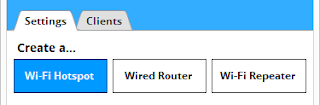
After installation, Now time to setup your WiFi hotspot. Follow these steps :1: On the ‘Settings Tab’ click on the ‘Wi-Fi Hotspot’ button.
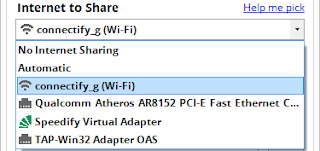
2: In the ‘Internet to Share’ dropdown select the adapter you wish to share. This adapter should have a working connection to the Internet.
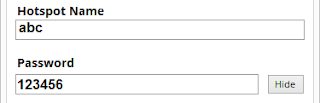
3: Give your hotspot a name (SSID) and password. The hotspot name is the network name that other devices will see and authenticate to using your unique hotspot password.
4: Then click the ‘Start Hotspot’ button to begin sharing your Internet connection with your WiFi enabled devices.
Go to link Download
Friday, October 14, 2016
WiFi Tether Router APK
WiFi Tether Router APK

THIS APP WORKS ONLY IF YOU HAVE ROOT PERMISSION
*** FOR REQUESTS SUPPORT OR HELP ON THE CONFIGURATION WRITE ME TO EMAIL, DO NOT NEED TO WRITE REVIEWS / FEEDBACK FOR THIS ***
REQUESTS FOR SUPPORT MUST BE MADE FROM YOUR GMAIL ACCOUNT WITH WICH YOU PURCHASED THE APP
PLEASE, IF YOU HAVE ANY PROBLEMS, CONTACT US BY EMAIL AT SNCLABS@GMAIL.COM BEFORE LEAVING NEGATIVE FEEDBACK. PLEASE UNDERSTAND THAT SUCCESSFUL WIFI TETHERING IS OFTEN SOMETIMES HARDWARE-SPECIFIC WITH VARYING SOFTWARE CONDITIONS.
*** If you have problems with Android 4.3 / 4.4, be sure you have DISABLED (unchecked) the "Scan always available" option following path: Settings -> WiFi -> Advanced -> Scan always available ***
FOR T-MOBILE USERS AND NEXUS 5
Need to change your APN, simply navigate to Settings > More > Mobile networks > Access Point Names. Select your T-Mobile APN, and scroll to APN protocol. Change this to IPv4, and then save your APN.
Now compatible with: Galaxy S4, Nexus 4, Nexus 5, Galaxy S5, Samsung Galaxy Tab, Galaxy Note 3 and other devices
Working in Progress for LG G2 and LG Flex
https://sites.google.com/site/wifitetherrouter/
Games Online with Xbox or Play Station? this app can correct the problem MTU
Turn your device into a WiFi Router! WiFi Tether Router lets you use your smartphone as a WiFi hotspot without additional costs.
Most cellular providers charge additional rates on top of your smartphone data plan for tethering or hotspot usage. With WiFi Tether Router, however, you can connect to the internet via another wifi-enabled device through your carrier’s data plan that is already associated with your phone!
Compatible with most PC’s, tablets, smartphones, or other portable devices. Also compatible with Android 4.0.x 4.1.x, Android 4.2.x and Android 4.3 (Ice Cream Sandwich, Jelly Bean). Language support for Italian, English and French.
WiFi Tether Router is simple to use without complexities. Simply configure the your hotspot by first naming your personal network (located under “Configure WiFi Router”), then select “Enable WiFi Router” to begin surfing the web from your secondary device or PC.
As noted above, each individual smartphone/tablet is different in a myriad of ways, so in cases where a connection is does not work right away, please email snclabs@gmail.com so that we can address your specific situation. We make every effort to respond promptly to inquiries, and you can view some of our customer service success stories in the reviews below. We are constantly improving the code and features of WiFi Tether Router, so your feedback is important!
tags:
HotSpot
NAT
connection share
MTU
xbox live
dns change
Screenshot


Download APK:
Direct Download APKGoogle Play Store:
https://play.google.com/store/apps/details?id=net.snclab.wifitetherrouter
Go to link Download
Wednesday, October 12, 2016
WiFi Network Monitor v1 0 Final
WiFi Network Monitor v1 0 Final

WiFi Network Monitor is a useful tool to remotely scan and discover all the systems
connected to your Wireless network.It helps you to keep a watch on your Wi-Fi network and
safe guard it from Hackers as well as other unauthorised users.
Its swift scan powered by ARP based Multi-threading technique enables you to scan the
entire network in just few seconds. It can detect all the systems connected to your Wi-Fi
network including desktops, laptops, mobiles, home systems and other portable devices.
By default, it automatically finds IP address range of your network. However you can also
perform Manual Scan of only certain portion of the network.
For each system, it displays IP address, Host name, MAC address and current status during
the scan operation. It also identifies the Router as well as your local computer among the
discovered devices.
Being GUI based tool makes it very easy to use with just a click of button.
Wi-Fi Network Monitor is fully portable and works on all platforms starting from Windows XP
to Windows 8.
Features:
Scan and discover all the devices connected to your Wi-Fi Network
Detect hackers/rogue users connected to your network
Swift Multi-threaded scan takes only few seconds
Perform Automatic or Manual scan of network
Shows IP address, MAC address, Device Name
Stop the scanning operation at any time
Save the Wi-Fi scan report to HTML/XML/TEXT/CSV file
easy to use tool with cool GUI interface
Installation
install the setup
This is a portable version no need to activate
enjoy......................
DONWLOAD HERE:>
Go to link Download
Thursday, October 6, 2016
UBUNTU 12 04 Comment partager une connexion internet en WiFi
UBUNTU 12 04 Comment partager une connexion internet en WiFi

-----

Interface connexion & réseau

Modification des connexions

Onglet Sans fil > Ajouter

Nom & Mode : Ad hoc

Paramétres IPv4 > partager avec dautre ordinateurs

Paramétres IPv6 > ignorer , puis enregistrer
maintenant
Créer un nouveau réseau sans fil

------

New > puis selectionné le nom du wifi crée > create
et voila vous pouvez activer/désactiver votre wifi par ici

Maintenant vous pouvez utiliser le wifi

------

Enjoy !!
Go to link Download
Sunday, October 2, 2016
Wifi Password 1 5 apk File Download
Wifi Password 1 5 apk File Download
 |
| How to Hack Wifi Password |
You are downloading Wifi Password 1.5 .apk file in your Android device and in order to download you have provided a direct download link and a Google Play store link below on which you can simply click and download the .apk file of Wifi Password 1.5 Android app. Wifi Password 1.5 Android app allows Android users to recover passwords for wireless networks.
Download WifiPassword 1.5 .apk File
- Download APK from Google Drive
- Download from Google Play Store
Go to link Download
Wednesday, September 28, 2016
Wifi Hacker Prank 1 5 apk File Free Download
Wifi Hacker Prank 1 5 apk File Free Download
 |
| Wifi Hacker Prank 1.5 |
You are downloading Wifi Hacker Prank 1.5 .apk file in your Android device and in order to download you have provided a direct download link and a Google Play store link below on which you can simply click and download the .apk file of Wifi Hacker Prank 1.5 Android app. Wifi Hacker Prank is a JOKE app. It only pretends hacking into secured wifi network.
Download Wifi Hacker Prank 1.5 .apk File
- Download APK from Google Drive
- Download from Google Play Store
Go to link Download
Friday, September 2, 2016
Wifi Password Recovery Backup 3 9 apk For Android
Wifi Password Recovery Backup 3 9 apk For Android
 |
| Wifi Password Recovery Backup 3.9 |
You are downloading WiFi Password Recovery Backup 3.9 .apk file for your Android device and in order to download you have provided a direct download link and a Google play link below on which you can simply click and download the .apk file of WiFi Password Recovery Backup 3.9 .apk file. WiFi Password Recovery Backup 3.9 Android app lists all WiFi passwords stored on your device alphabetically, backs up the list in a file to the memory card and restore it when you want with one-click.
Download WiFi Password Recovery Backup 3.9 .apk File
- Download APK from Google Drive
- Download from Google Play Store
Go to link Download
Subscribe to:
Posts (Atom)