Monday, January 30, 2017
Windows Phone 8 system update announced by Microsoft
Windows Phone 8 system update announced by Microsoft
Microsofts new system supports NFC touch-and-go payment technology
 Windows Phone 8 shares much of its code with the firms PC system, making it easier for developers to write programs for different types of devices.
The company said it should mean there would be some "amazing games" for handsets running its new release.
A tie-up with Nokia has already brought several Windows Phone devices to market, but sales lag some way behind models running Android or Apples iOS.
Microsoft said Nokia, Samsung, HTC and Huawei would all be making devices powered by the system upgrade.
High-def handsets Other new features announced at the Windows Phone Summit event in San Francisco included:
- Support for multi-core chips, allowing devices to turn on cores to access extra processing power when needed, and to switch off cores when not to preserve battery life
- The ability to work with different screen resolutions including the high definition 720p format
- Support for removable Micro SD cards allowing users to store more media files or install apps saved on the format
- A new "wallet" app allowing the phone to act as both credit and membership cards. It also supports NFC (near field communication) payments
- Built-in maps from Nokias Navteq division with turn-by-turn navigation
- A more customisable start screen allowing users the choice of three tile sizes to represent installed software and more colour options
- A warning alert if the software believes a website contains malware or is otherwise unsafe
 Application tiles can be made to look smaller
 This addresses a complaint that the firms own Skype program could not be used to receive calls while its owner was using another application - a function offered on rival platforms.
The firm said VoIP calls should now "feel like any other call" made or received by Windows Phone handsets.
Windows 8 and Windows Phone 8 strongly resemble each other - at least when the PC system is run under its Metro interface - and Microsoft was keen to stress that their relationship goes deeper than appearance alone.
The two will share a range of components including graphic drivers, the DirectX collection of application programming interfaces (APIs) and the NT kernel that ties application software to the hardware it is installed on. They can also both support native code in the C and C++ programming languages.
Microsoft said this should not only make it easier to port software between the two environments, but should speed up the time it takes developers to recode programs originally built for iOS and Android.
More games Microsoft noted more than 100,000 apps had been released for Windows Phone 7.
By contrast there are more than 466,500 programs in the Android marketplace according to search site Appbrain, and "over 500,000" in Apples app store according to the iPhone maker.
 The system software that powers Microsofts Surface tablets shares many components with Windows Phone 8
 "Until now handsets running Microsofts system have been missing some of the most innovative applications and popular games," said Malik Saadi, principal analyst at Informa Telecoms.
"Now with the update from Windows Phone 7 to 8 this should be addressed. Many of the developers I had spoken to had said they were holding off until they knew more about the new system. It looks like that barrier has now gone."
Go to link Download

Thursday, January 12, 2017
Using RegDevelop to Create your own Hardware and System Information Program
Using RegDevelop to Create your own Hardware and System Information Program
Gathering of computer hardware and system information about the central processing unit (CPU), Memory Card (RAM), BIOS, motherboard, and other hardware peripherals are usually needed in many cases for hardware verification, driver installation and driver update.
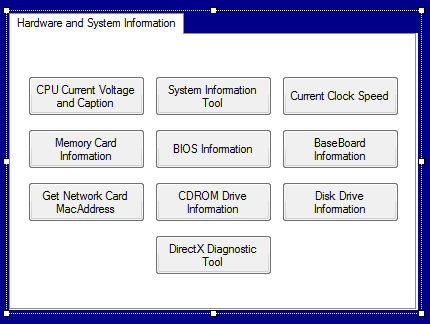
Here’s a guide to create your own program using Regdevelop. All you need are commands use to get the hardware information.
How-to-do
Open the program and drag the button control and start configuring the settings.
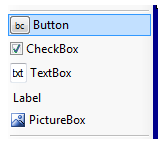
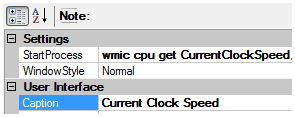
Sample Settings
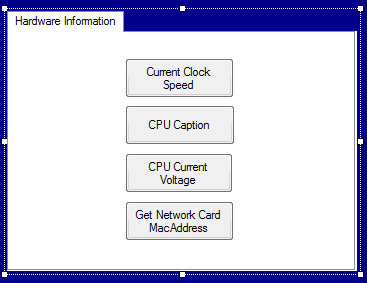
----------------------------------------------------------------
Caption
CPU Current Voltage and Caption
StartProcess
cmd /k wmic cpu get caption,currentvoltage
----------------------------------------------------------------
Caption
System Information Tool
StartProcess
msinfo32
----------------------------------------------------------------
Caption
Current Clock Speed
StartProcess
wmic cpu get CurrentClockSpeed,MaxClockSpeed /every:3
----------------------------------------------------------------
Caption
Memory Card Information
StartProcess
cmd /k wmic memorychip get FormFactor,serialnumber,partnumber,speed,capacity,name
----------------------------------------------------------------
Caption
BIOS Information
StartProcess
cmd /k wmic bios get name,version,serialnumber
----------------------------------------------------------------
Caption
BaseBoard Information
StartProcess
cmd /k wmic baseboard get manufacturer,serialnumber
----------------------------------------------------------------
Caption
Get Network Card MacAddress
StartProcess
cmd /k wmic nic get macaddress,description,speed
----------------------------------------------------------------
Caption
CDROM Drive Information
StartProcess
cmd /k wmic cdrom get drive,id,volumeserialnumber,manufacturer
----------------------------------------------------------------
Caption
Disk Drive Information
StartProcess
cmd /k wmic diskdrive get model,serialnumber,size
----------------------------------------------------------------
Caption
DirectX Diagnostic Tool
StartProcess
dxdiag.exe
----------------------------------------------------------------
Finally, Click the Build Now Button. Enjoy!
Go to link Download
Tuesday, November 22, 2016
What is System Restore How to Create a System Restore Point in Windows 7 8 XP Vista
What is System Restore How to Create a System Restore Point in Windows 7 8 XP Vista
Go to link Download
Sunday, September 25, 2016
Windows 8 System for All Your Gadgets
Windows 8 System for All Your Gadgets

Inicio en el menu will look funny. Microsoft has decided to change the FEATURES that define, create "tiles" (see ABOVE) del de inicio NOT a traditional menu. New menu shows the applications tiles are put in a box, much like the interface Metro First introduced in Windows Phone. And there is no empezar button. No more ctrl-alt-delete, I Just Can press entrar, thats good.
All kinds of navigation options. Cross-section of the Plataforma estratégicamente All sorts of way gives users to access the system. "Windows 8 new Start screen provides an easy to use and intuitive interface," explains the manual de consumers to Microsofts business New New-posted. "With the full inmersión 8 de Windows applications and support for multi-touch and teclado traditional and Raton."
And indeed, during the presentation vice presidencial alto Julie Larson Green swiped from the display screen to the tableta. "Hes going through conmutación application by swiping from left side", apunt clear, the direct de blog event. "Its pretty slick multitarea manager". COMPANY deputy Antoine Leblond presidencial navigated portátil and said, "I could use the wheel, page up page to the bottom, Juego de palabras what you expect". As expected, the application click Open. And, navigating to and from the screen version of Microsoft involves hot corner. "If I only want to Return to the Home view, I moved to the bottom left corner if you want to open an application, you move to the bottom there -. Thats where the inicio First", entre otras cosas continue.
A aplicación store. Microsoft now has saturación. This is called Tienda de Windows and have hundreds of applications from both third-party developers and Microsoft, explained Press Release. Just published. Bono: Sr application. Free, as long vista previa consumers, at least.
On the developer side, back when Microsoft announced the developer preview of Windows 8, we recommend that developers want Microsoft to Open Systems. Microsoft confirmed this. "One nice thing about working in the Customer Preview has been talking to developers," Leblond said. "They were very nice to transparency and clarity by adding the application to the Economic app store We have the best out there .. We have a range of never before for their application".
Go to link Download
Windows 7 Ultimate ISO Free Download 32 and 64 Bit Full Operating System
Windows 7 Ultimate ISO Free Download 32 and 64 Bit Full Operating System

Read More at Wikipedia
 Windows media center enhanced the movies and photos slide show functionality of windows 7 ultimate. Download windows 7 ultimate iso free and enjoy playing HD movies on windows media center. You can easily play a song while images slide show in media center. The image effects are amazing and exciting. If you need a software to play all kind of media on windows 7 then download and install free player. When you install this you get option whether you want 32 bit or 64 bit. Please choose it based on your computer architecture. Desktop navigation is super fast and smooth in windows 7 ultimate version.
Windows 7 firewall is more secure with inbound and outbound firewall rules. You can build application on cloud windows 7. You can also uninstall windows 7 to upgrade to latest Windows release. If don’t want to download & install Full Operating System, You can install windows 7 virtual machine. Windows 7 widgets are useful for productivity. There is huge Microsoft tech support for windows 7.

Windows 7 Ultimate Features and Review:
- Start application faster
- Swift Internet Explorer with Enhanced Web Connectivity
- Ease of Network Creation
- Remote assistance windows 7 is enhanced
 Download Mirrors for Windows 7 Ultimate ISO 32 bit and 64 bit :
- Download Windows 7 Ultimate 32 Bit ISO Image
- Download Windows 7 Ultimate 64 Bit ISO Image
- Download Windows 7 Ultimate SP1 32 Bit ISO Image
- Note:Learn Here how to Make USB or Pendrive or DVD bootable.
Go to link Download