Showing posts with label 64. Show all posts
Showing posts with label 64. Show all posts
Sunday, July 30, 2017
Windows 10 Free 32 BIT 64 BIT ISO Files Download
Windows 10 Free 32 BIT 64 BIT ISO Files Download
Windows 10 Free 32 BIT & 64 BIT .ISO Files Download
If you are running original windows 7 and windows 8.x any version then you are eligible to get free 1 year upgrade to windows 10, yes your 1 year is going to be free experimenting, enjoying and working productively on windows 10. In case you have not seen my top 7 reason for upgrading to windows 10 you must look at that to see what all windows 10 has to offer.Now straight to this post, now obviously after the release of the technical preview it took some time for Microsoft to implement few last tweaks to its build but now as it was released on 29th of July every genuine windows owner is getting free 1 year upgrade to this awesome new OS.

So you might have seen this small windows icon, which on click told you to reserve your copy of free windows 10 upgrade. Like I did earlier and I got this notification that my windows 10 upgrade has started to download. But now the main problem is that I cannot download it right now as I am limited to my internet, as I am using Airtel 4G it permits me to download only 15Gb per month from which I have already utilized 10GB and I do not want to waste another 3GB.
Also: How to Change your Default Web Browser in Windows 10
So in that I will be downloading the latest windows 10 using the .ISO direct file link, either for 32 BIT or 64 BIT, so lets see how it can be done.
Getting Original Windows Installation Product Key
Now as its said, if you have registered your original windows earlier, then you are eligible of getting 1 year free upgrade for windows 10, so its very important to note down your product key, you can do that by running a simple command and getting your original windows installation product key.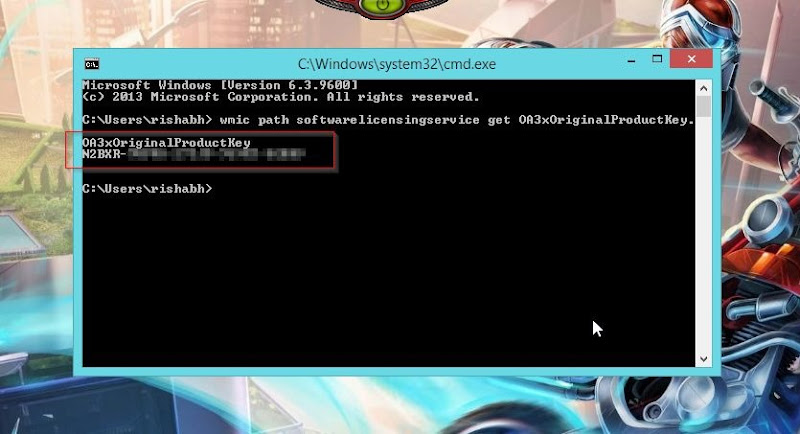
So as you can see from the above image, I just got mine after running a simple command, so to get your Open RUN Dialog by pressing Ctrl + R and then typing CMD in that to open the command menu now copy below code and paste in it, you can paste in command by right clicking and choosing paste option.
wmic path softwarelicensingservice get OA3xOriginalProductKey.
So after you get your windows key, below are downloadable links to windows 10, download the one that you want.
Windows 10 .ISO Direct Links Free Download
Now we have two different version 32 BIT and 64 BIT, so select wisely which one you wanna download, as the download is quiet BIG. Now after you download media creation tool, these will start downloading your windows 10 version and then you will get a direct .ISO file, that you can burn to a DVD and boot to get a new windows OS.So I guess you are pretty much sure on how to install windows onto your system, in case these media creation tools are confusing that check this guide on how to use them, so guys have fun, hope your windows OS gets updated to windows 10 and you are able to use windows 10 with full enjoyment.
Go to link Download

Thursday, July 27, 2017
Windows 7 Ultimate Free Download ISO 32 64 Bit
Windows 7 Ultimate Free Download ISO 32 64 Bit

Windows 7 Ultimate Free Download ISO file from here which works for both 32 bit and 64 bit. Download Windows 7 Ultimate Official Untouched ISO free version.
Windows 7 operating system is still considered industries best. This can be imagined in such a way that some windows 7 lovers are downgrading their new computer from windows 8 to windows 7 ultimate. So if you want to optimize pc speed and get best performance then do install fresh windows 7 ultimate iso.
Windows media center enhanced the movies and photos slide show functionality of windows 7 ultimate. Download windows 7 ultimate iso free and enjoy playing HD movies on windows media center. You can easily play a song while images slide show in media center. The image effects are amazing and exciting. If you need a software to play all kind of media on windows 7 then download and install free player. When you install this you get option whether you want 32 bit or 64 bit. Please choose it based on your computer architecture.
You can also Download Windows 7 All in One ISO if you are interested in multiple editions in single ISO. Desktop navigation is super fast and smooth in windows 7 ultimate version. Windows 7 firewall is more secure with inbound and outbound firewall rules. You can build application on cloud windows 7. You can also uninstall windows 7 to upgrade to latest Windows release. If don’t want to download & install Full Operating System, You can install windows 7 virtual machine. Windows 7 widgets are useful for productivity. There is huge Microsoft tech support for windows 7. You can Download Windows 10 ISO as well which is latest release from Microsoft.
Windows 7 Ultimate Features and Review
Start application faster Swift Internet Explorer with Enhanced Web Connectivity Ease of Network Creation Remote assistance windows 7 is enhanced Complete backup and Recovery Solution, in case you need 3rd party recovery program then try free data recovery software.
Detailed Windows 7 Features are listed on official Windows site.
Windows 7 Ultimate Free Download ISO 32/64 Bit
Well still searching how to download windows 7 ultimate version iso free? Click on below button to download free windows 7 iso 32 bit and 64 bit.
How To Install Windows 7 from USB Pen Drive
I have already posted a tutorial to install window 7 from USB. Once you create boot able flash drive, Then plugin into computer and boot from USB. Let me know if you hit any issues while installing Microsoft windows 7.
Windows 7 operating system is still considered industries best. This can be imagined in such a way that some windows 7 lovers are downgrading their new computer from windows 8 to windows 7 ultimate. So if you want to optimize pc speed and get best performance then do install fresh windows 7 ultimate iso.
Windows media center enhanced the movies and photos slide show functionality of windows 7 ultimate. Download windows 7 ultimate iso free and enjoy playing HD movies on windows media center. You can easily play a song while images slide show in media center. The image effects are amazing and exciting. If you need a software to play all kind of media on windows 7 then download and install free player. When you install this you get option whether you want 32 bit or 64 bit. Please choose it based on your computer architecture.
You can also Download Windows 7 All in One ISO if you are interested in multiple editions in single ISO. Desktop navigation is super fast and smooth in windows 7 ultimate version. Windows 7 firewall is more secure with inbound and outbound firewall rules. You can build application on cloud windows 7. You can also uninstall windows 7 to upgrade to latest Windows release. If don’t want to download & install Full Operating System, You can install windows 7 virtual machine. Windows 7 widgets are useful for productivity. There is huge Microsoft tech support for windows 7. You can Download Windows 10 ISO as well which is latest release from Microsoft.
Windows 7 Ultimate Features and Review
Start application faster Swift Internet Explorer with Enhanced Web Connectivity Ease of Network Creation Remote assistance windows 7 is enhanced Complete backup and Recovery Solution, in case you need 3rd party recovery program then try free data recovery software.
Detailed Windows 7 Features are listed on official Windows site.
Windows 7 Ultimate Free Download ISO 32/64 Bit
Well still searching how to download windows 7 ultimate version iso free? Click on below button to download free windows 7 iso 32 bit and 64 bit.
How To Install Windows 7 from USB Pen Drive
I have already posted a tutorial to install window 7 from USB. Once you create boot able flash drive, Then plugin into computer and boot from USB. Let me know if you hit any issues while installing Microsoft windows 7.

Windows 7 x86 | Windows 7 x64
Go to link Download
Monday, January 30, 2017
Windows 8 Pro ISO 32 Bit 64 Bit Free Download Full Setup Windows 8 Pro
Windows 8 Pro ISO 32 Bit 64 Bit Free Download Full Setup Windows 8 Pro


Read more at Wikipedia about Windows 8.1
Microsoft has just released Windows 8.1 which will be a major update to Windows 8. This update will be officially launched at last quarter of 2013. But at the moment its great opportunity to preview this Windows 8.1 release. You can download Windows 8.1 disk image ISO files and install them on your machines. Windows 8.1 download links are provided at the bottom of this post. You can also experience Windows 7 which was the previous version of Windows 8.

- Integrated VPN
- Broadband Tethering
- NFC Tap To Pair Support
- Web Application Proxy
- Enhanced Environment for Virtual Desktops
- Direct Desktop Boot Support
- Resize Apps Windows
- Improved Device Encryption
- Resistance to Everyday Malware Attacks
- Remote Business Data Removal in case of lost or Stolen
- Automated Lock Down Feature

Watch out here the new Windows 8.1 Feature over Windows 7
Download Mirrors for Windows 8.1:
- Download Windows 8.1 Pro 32 bit - 2.45 GB
- Download Windows 8.1 Pro 64 bit - 3.33 GB
NOTE: These are the Installation Key not the Activation Key and it is Self Provided by Microsoft.
- Click here to Visit to the Installation Keys Page
Go to link Download
Saturday, January 14, 2017
Windows 10 Build 10130 ISO 32 64 Bit
Windows 10 Build 10130 ISO 32 64 Bit

Windows 10 Build 10130 ISO 32 / 64 Bit Free Download Latest Version. It is full Bootable ISO Image of Windows 10 Build 10130 for 32 bit 64 Bit PC.
Windows 10 Build 10130 ISO 32 64 Bit Overview
Microsoft has surprised Insiders with a new build 10130 as the Insiders were not expecting a new build as Windows 10 Build 10125 has just released a few days ago.
With Windows 10 Build 10130 Microsoft has improved and polished few features which will enhance the experience. Microsoft has described this build as more polished and stable of the lot. You can also download Windows 10 Build 10125 ISO 32/64 Bit.
Microsoft Windows 10 is expected to be released in July this year and the builds which are coming out are emphasizing more on fixing the issues rose in previous versions rather than putting new features. But there are few enhancements like the Start menu has been improved and Start experience has been made a bit better. A “New” label has been included next to All Apps which indicates that new applications have been installed into the system. In the Tablet mode the hamburger button will show a bog dot indicating that new apps have been installed into your system. Tablet mode has also been upgraded and users can open the app commands by just swiping in the top edge. The taskbar gets Universal Back button which will work in the same way as in Windows Phone. You may also like to download Windows 10 Build 10122 ISO 32/64 Bit.
Features of Windows 10 Build 10130 ISO 32/64 Bit
Below are some noticeable features which you’ll experience after Windows 10 Build 10130 ISO 32/64 Bit free download.
Before you start Windows 10 Build 10130 ISO 32/64 Bit free download, make sure your PC meets minimum system requirements.
Click on below button to start Windows 10 Build 10130 ISO 32/64 Bit Free Download. This is complete offline installer and standalone setup for Windows 10 Build 10130 ISO 32/64 Bit. This would be compatible with both 32 bit and 64 bit windows.
Windows 10 Build 10130 ISO 32 64 Bit Overview
Microsoft has surprised Insiders with a new build 10130 as the Insiders were not expecting a new build as Windows 10 Build 10125 has just released a few days ago.
With Windows 10 Build 10130 Microsoft has improved and polished few features which will enhance the experience. Microsoft has described this build as more polished and stable of the lot. You can also download Windows 10 Build 10125 ISO 32/64 Bit.
Microsoft Windows 10 is expected to be released in July this year and the builds which are coming out are emphasizing more on fixing the issues rose in previous versions rather than putting new features. But there are few enhancements like the Start menu has been improved and Start experience has been made a bit better. A “New” label has been included next to All Apps which indicates that new applications have been installed into the system. In the Tablet mode the hamburger button will show a bog dot indicating that new apps have been installed into your system. Tablet mode has also been upgraded and users can open the app commands by just swiping in the top edge. The taskbar gets Universal Back button which will work in the same way as in Windows Phone. You may also like to download Windows 10 Build 10122 ISO 32/64 Bit.
Features of Windows 10 Build 10130 ISO 32/64 Bit
Below are some noticeable features which you’ll experience after Windows 10 Build 10130 ISO 32/64 Bit free download.
- More polished and stable build of the lot.
- A “New” label has been included next to All Apps.
- A big dot has been included in hamburger to indicate newly installed apps.
- Enhanced tablet mode.
- Universal back button included in taskbar.
- Enhanced Start menu.
- Software Full Name: Windows 10 Build 10130 x86 x64
- Setup File Name: en_windows_10_pro_10130_x86_dvd.iso, en_windows_10_pro_10130_x64_dvd.iso
- Full Setup Size: 2.7 GB, 3.6 GB
- Setup Type: Offline Installer / Full Standalone Setup
- Compatibility Architecture: 32 Bit (x86) / 64 Bit (x64)
- Latest Version Release Added On: 31st May 2015
- License: Free
- Developers: Microsoft Windows 10 Homepage
Before you start Windows 10 Build 10130 ISO 32/64 Bit free download, make sure your PC meets minimum system requirements.
- Memory (RAM): 1GB of RAM required.
- Hard Disk Space: 16GB of free space required.
- Processor: 1GHz Intel Pentium processor or later.
Click on below button to start Windows 10 Build 10130 ISO 32/64 Bit Free Download. This is complete offline installer and standalone setup for Windows 10 Build 10130 ISO 32/64 Bit. This would be compatible with both 32 bit and 64 bit windows.
Window 10 x86 | Window 10 x64
Go to link Download
Monday, January 2, 2017
Windows 7 Ultimate Full Version 32 Bit and 64 Bit Free Download
Windows 7 Ultimate Full Version 32 Bit and 64 Bit Free Download

This is the Genuine Windows 7 Ultimate SP1 in both 32 bit and 64 bit along with the Activator. This contains the latest Windows Updates and does not make any generated byMicrosoft issue unlike the Pirates version.
System Requirement:
1 Minimum One Gigahertz processor (both in 32 (x86) bit and 64 bit).
2 Minimum 2 GB of RAM.
3 -At least 20 GB of free hard disk space.
How to install Windows 7 Ultimate SP1:
First, download the ISO file and join it Using HJ-Split. If you do not know how to join the duck is the How to Join the Parts / Files Using HJ-Split.
Burn the ISO into a DVD or USB Pen Drive Using the Installer.
Follow the instructions.
After installation use the Activator and enjoy the windows.
Search Terms For
windows 7 activator,windows 7 product key, download windows 7 full version, windows 7 ultimate,windows 7 free download, windows 7 install tool, windows 7 32 bit, windows 7 64 bit, windows 7 full version free download
Download Links
Windows 7 32(x86)bit
Part 1 | Part 2 | Part 3
Windows 7 64 bit
Part 1 | Part 2 | Part 3 | Part 4
Go to link Download
Sunday, January 1, 2017
uTorrent 3 1 3 Build 27327 32 64 Bit
uTorrent 3 1 3 Build 27327 32 64 Bit
uTorrent 3.1.3 (Build 27327) 32-64 Bit
 |
| uTorrent 3.1.3 (Build 27327) 32-64 Bit VirtualSoftZone.blogspot.com |
µTorrent is a small and incredibly popular BitTorrent client.
Micro-Sized Yet Feature Filled
Most of the features present in other BitTorrent clients are present in µTorrent, including bandwidth prioritization, scheduling, RSS auto-downloading and Mainline DHT (compatible with BitComet). Additionally, µTorrent supports the Protocol Encryption joint specification (compatible with Azureus 2.4.0.0 and above, BitComet 0.63 and above) and peer exchange.
Resource-Friendly
µTorrent was written with efficiency in mind. Unlike many torrent clients, it does not hog valuable system resources – typically using less than 6MB of memory, allowing you to use the computer as if it weren’t there at all. Additionally, the program itself is contained within a single executable less than 1 MB in size.
Skinnable and Localized
Various icon, toolbar graphic and status icon replacements are available, and creating your own is very simple. µTorrent also has support for localization, and with a language file present, will automatically switch to your system language. If your language isn’t available, you can easily add your own, or edit other existing translations to improve them!
Actively Developed and Improved
The developer puts in a lot of time working on features and making things more user-friendly. Releases only come out when they’re ready, with no schedule pressures, so the few bugs that appear are quickly addressed and fixed.
“Click here to Download”
Thanks for downloading……..
Go to link Download
Saturday, December 31, 2016
Windows 8 Professional Enterprise 32 64 Bit Keys
Windows 8 Professional Enterprise 32 64 Bit Keys
 |
Windows 8 Professional+Enterprise 32/64 Bit+Keys (4 in 1 iso) |
Windows 8 Professioanl & Enterprise Edition
Direct Download Link+Activation Key
Free Download Windows 8 Professional And EnterPrise Edition (x86_x64) Bit 4 in One ISO File and Direct Download Link. So Download and Enjoy New Windows 8 Professional or EnterPrise From One ISO File. Windows 8 RTM AIO Professional and Enterprise. This is 4 different windows 8 RTM in one iso file.
 |
| WIndows 8 ISO File Included the Following Versions: |
1. Windows 8 Professional 32 Bit
2. Windows 8 Professional 64 Bit
3. Windows 8 Enterprise 32 Bit
4. Windows 8 Enterprise 64 Bit
Go to link Download
Sunday, December 18, 2016
VueScan Pro v9 0 94 Multilanguage x86 64
VueScan Pro v9 0 94 Multilanguage x86 64

VueScan changes nothing on your system, installs nothing in your operating system and all other scanner software will continue to function. VueScan increases your productivity and saves you money. VueScan has advanced scanning options, powerful features, and greatly improves your scans with superior color accuracy and better color balance. VueScan supports more than 700 scanners and 209 digital camera raw files and takes about 5 minutes to download and install.
Features:
- Works with 1200 flatbed and film scanners
- Runs on Mac OS X, Windows and Linux
- Improves your productivity and quality of scans
- Has been downloaded more than 5 million times
- Create raw scan files
- ICC profiles and color spaces
- IT8 color calibration
- Fixed problem with some HP doc feeders
- Fixed problem with some Epson doc feeders
- Fixed problem with Epson DS-30
- Fixed problem with Epson V330 transparency scans at 4800 dpi
- Improved scan speed with Epson GT-1500
- Added support for legal size with some Canon MFPs
- Fixed problem with Avision FB1210U

| Letitbit | Turbobit | Rapidgator |
Go to link Download
Thursday, December 8, 2016
Windows 10 Build 10074 ISO 32 64 Bit
Windows 10 Build 10074 ISO 32 64 Bit

Windows 10 Build 10074 ISO 32 / 64 Bit Free Download Latest Version. It is final bootable Image of Windows 10 Build 10074 ISO for 32 bit 64 Bit PC.
Windows 10 Build 10074 ISO 32 / 64 Bit Overview
Windows 10 is the latest operating system from Microsoft. Since the release oWindows 10 Build 10074 ISO 32 / 64 Bit Free Downloadf windows 10 Technical Preview lots of builds have come in the arena in order to enhance the user’s experience for operating Windows.
With these builds Microsoft improves the functionality as well as well fixes any issues which come in user’s way. Only few days ago Microsoft released Windows 10 Build 10074 ISO 32/64 Bit and now there is a new build in the market Windows 10 Build 10074 ISO 32/64 Bit. With this build it has been proven once again that Microsoft does follow the feedback from Insiders as you will discover that they have updated the icons in this latest build.
There is a pleasant change in the icons form the last build i.e 10074. At first Microsoft experimented with the Recycle Bin icon and changed it from that of Windows 8 and after an overwhelming response, Microsoft with this latest build (10125) has gone one step further and changed numerous icons across user interface. You can also download Windows 10 Build 10074 ISO 32/64 Bit
Changes have also been made in the descriptive language which is used in Setup. The Start experience has seen an update and there is a new menu known as hamburger right at the top left corner. Then there is a Universal back button in the taskbar. In order to see this newly added button you need to be in the Tablet mode. You can also download Windows 10 Build 10061 ISO 32/64 Bit.
A grid of letter icons have been included in The All Apps view in order to quickly access your desired application. All you need to do is to press the letter by which your desired application starts.
Features of Windows 10 Build 10074 ISO 32 / 64 Bit
Below are some noticeable features which you’ll experience after Windows 10 Build 10074 ISO 32/64 Bit free download.
Software Full Name: Windows 10 Build 10074 ISO x86 x64
Before you start Windows 10 Build 10074 ISO 32/64 Bit free download, make sure your PC meets minimum system requirements.
Click on below button to start Windows 10 Build 10074 ISO 32/64 Bit Free Download. This is complete offline installer and standalone setup for Windows 10 Build 10074 ISO 32/64 Bit. This would be compatible with both 32 bit and 64 bit windows.
Windows 10 Build 10074 ISO 32 / 64 Bit Overview
Windows 10 is the latest operating system from Microsoft. Since the release oWindows 10 Build 10074 ISO 32 / 64 Bit Free Downloadf windows 10 Technical Preview lots of builds have come in the arena in order to enhance the user’s experience for operating Windows.
There is a pleasant change in the icons form the last build i.e 10074. At first Microsoft experimented with the Recycle Bin icon and changed it from that of Windows 8 and after an overwhelming response, Microsoft with this latest build (10125) has gone one step further and changed numerous icons across user interface. You can also download Windows 10 Build 10074 ISO 32/64 Bit
Changes have also been made in the descriptive language which is used in Setup. The Start experience has seen an update and there is a new menu known as hamburger right at the top left corner. Then there is a Universal back button in the taskbar. In order to see this newly added button you need to be in the Tablet mode. You can also download Windows 10 Build 10061 ISO 32/64 Bit.
A grid of letter icons have been included in The All Apps view in order to quickly access your desired application. All you need to do is to press the letter by which your desired application starts.
Features of Windows 10 Build 10074 ISO 32 / 64 Bit
Below are some noticeable features which you’ll experience after Windows 10 Build 10074 ISO 32/64 Bit free download.
- Icons have been updated.
- Descriptive language has been changed in Setup.
- Start experience has seen an update.
- A new hamburger icon has been included.
- Universal Back button included.
- Grid of letters icon has also been included.
- Enhanced user experience.
Software Full Name: Windows 10 Build 10074 ISO x86 x64
- Setup File Name: 10125.0.150516-2126.FBL_IMPRESSIVE_CLIENTPRO-CORE_OEMRET_X86FRE_EN-US.ISO
- 10125.0.150516-2126.FBL_IMPRESSIVE_CLIENTPRO-CORE_OEMRET_X64FRE_EN-US.ISO
- Full Setup Size: 2.7 GB, 3.7 GB
- Setup Type: Offline Installer / Full Standalone Setup
- Compatibility Architecture: 32 Bit (x86) / 64 Bit (x64)
- Latest Version Release Added On: 27th May 2015
- License: Free
- Developers: Microsoft Windows 10 Homepage
Before you start Windows 10 Build 10074 ISO 32/64 Bit free download, make sure your PC meets minimum system requirements.
- Memory (RAM):1GB of RAM required.
- Hard Disk Space: 16GB of free space required.
- Processor: 1GHz Intel Pentium processor or later.
Click on below button to start Windows 10 Build 10074 ISO 32/64 Bit Free Download. This is complete offline installer and standalone setup for Windows 10 Build 10074 ISO 32/64 Bit. This would be compatible with both 32 bit and 64 bit windows.
Windows 10 x86 | Windows 10 x64
Go to link Download
Monday, November 28, 2016
Windows 10 ISO 32 Bit 64 Bit Free Download Full Setup Windows 10 ISO
Windows 10 ISO 32 Bit 64 Bit Free Download Full Setup Windows 10 ISO


That new Windows is Windows 10.
Windows 10 represents the first step of a whole new generation of Windows. Windows 10 unlocks new experiences for customers to work, play and connect. Windows 10 embodies what our customers (both consumers and enterprises) demand and what we will deliver.

Windows 10 will run across an incredibly broad set of devices – from the Internet of Things, to servers in enterprise datacenters worldwide. Some of these devices have 4 inch screens – some have 80 inch screens – and some don’t have screens at all. Some of these devices you hold in your hand, others are ten feet away. Some of these devices you primarily use touch/pen, others mouse/keyboard, others controller/gesture – and some devices can switch between input types.
We’re not talking about one UI to rule them all – we’re talking about one product family, with a tailored experience for each device.
And across this breadth of devices, we are delivering one application platform for our developers. Whether you’re building a game or a line of business application, there will be one way to write a universal app that targets the entire family. There will be one store, one way for applications to be discovered, purchased and updated across all of these devices.
Windows 10 will deliver the right experience on the right device at the right time. It will be our most comprehensive platform ever.

Now, during the design of a new Windows, we spend time with many diverse customers. One of the most important of these customers is the enterprise. In the past year I’ve talked to dozens of enterprise customers and listened to how they are using and deploying Windows, and what they need from us.
These customers are betting their businesses on Windows – in the first half of this year, shipments of enterprise PCs grew 14%. In that same time period, shipments of Windows enterprise tablets grew 33%.
These customers have a need to evaluate Windows early, so we are starting our dialog with them today.
Screenshots:


Download Mirrors for Windows 10 ISO 32 / 64 bit:
- Default English (Language)
- Download Windows 10 32 bit - 2.93 GB
- Download Windows 10 64 bit - 3.49 GB
- United Kingdom English (Language)
- Download Windows 10 32 bit - 2.94 GB
- Download Windows 10 64 bit - 3.79 GB
- Chinese (Language)
- Download Windows 10 32 bit - 3.05 GB
- Download Windows 10 64 bit - 3.96 GB
- Portuguese (Language)
- Download Windows 10 32 bit - 2.91 GB
- Download Windows 10 64 bit - 3.78 GB
Installation Key by Microsoft:
NOTE: These are the Installation Key not the Activation Key and it is Self Provided by Microsoft.
Product Key for Windows 10: NKJFK-GPHP7-G8C3J-P6JXR-HQRJR
Product Key for Windows 10: NKJFK-GPHP7-G8C3J-P6JXR-HQRJR
- Click here to Visit to the Installation Keys Page
- View the Windows 10 Shortcut Keys.
Go to link Download
Tuesday, November 22, 2016
Windows 7 Ultimate 32 Bit And 64 Bit Full Version Free Download
Windows 7 Ultimate 32 Bit And 64 Bit Full Version Free Download
 I have described About Windows 7. Download Windows 7 Ultimate 32 Bit and 64 Bit Full version free download via torrent.
System requirements For Windows 7:
- 1 gigahertz (GHz) or faster 32-bit (x86) or 64-bit (x64) processor
- 1 gigabyte (GB) RAM (32-bit) or 2 GB RAM (64-bit)
- 16 GB available hard disk space (32-bit) or 20 GB (64-bit)
- DirectX 9 graphics device with WDDM 1.0 or higher driver


Download Torrent
Go to link Download
Friday, November 18, 2016
What Is The Difference Between 32 bit 64 bit Windows
What Is The Difference Between 32 bit 64 bit Windows
“What is the difference between a 32-bit and 64-bit Windows operating system?” Most of you are running Windows XP or Vista in its 32-bit iteration. But as hardware gets cheaper, people are curious as to what the 64-bit operating system has to offer. First let’s see if we can grasp the difference between 32- and 64-bit.
Think of your computer as a series of tubes that can either be 32 or 64 bits wide. When you have the smaller 32-bit size, there is more potential for bottlenecks to occur. Bottlenecks slow down your system because one process has to wait for another to finish before it can begin. But if you want to have 64-bit wide tubes, your computer needs to be thinking in 64-bit so your software and hardware all need to support 64-bit.
If you do not know the difference between 32-bit and 64-bit, I would have told you in the past that you are running a 32-bit version of Windows. But now with Windows 7 I am seeing more and more 64-bit operating systems shipped by default without the end users knowledge. Don’t get me wrong, a 64-bit system is better but you also need to be running 64-bit programs and have a 64-bit processor or else all the trouble of setting up the 64-bit operating system would be worthless.
On a 32-bit operating system, you are restricted to a maximum of 3 gigabytes of RAM. On a 64-bit operating system, you really do not have a limit. Let’s look at Wikipedia and find out the maximum amount of RAM for a 64-bit operating system:


If you are running 3D modeling systems or AutoCAD systems, you can benefit from a x64 bit architecture but remember, you need to be running ALL x64 applications, print drivers and anything else you are setting up on your system to realize its full potential. Not all programs have been created for x64 yet and you will find yourself installing applications to your Program Files x86 directory. On a x64 machine, you will have two Program File directories — one for 32-bit and one for 64-bit applications.
So after reading through that and you still want to run a x64 operating system, you will need to make sure your processor supports x64. Most new servers and new computers bought this year or beyond will support x64 but you will still need to check. Here are some facts you should know:
If you are running a server that has all its hardware and software certified for x64, then you should install the 64-bit version but beware of device drivers and any 32-bit environments because if I used the word difficult, it would be an understatement!
Think of your computer as a series of tubes that can either be 32 or 64 bits wide. When you have the smaller 32-bit size, there is more potential for bottlenecks to occur. Bottlenecks slow down your system because one process has to wait for another to finish before it can begin. But if you want to have 64-bit wide tubes, your computer needs to be thinking in 64-bit so your software and hardware all need to support 64-bit.
If you do not know the difference between 32-bit and 64-bit, I would have told you in the past that you are running a 32-bit version of Windows. But now with Windows 7 I am seeing more and more 64-bit operating systems shipped by default without the end users knowledge. Don’t get me wrong, a 64-bit system is better but you also need to be running 64-bit programs and have a 64-bit processor or else all the trouble of setting up the 64-bit operating system would be worthless.
On a 32-bit operating system, you are restricted to a maximum of 3 gigabytes of RAM. On a 64-bit operating system, you really do not have a limit. Let’s look at Wikipedia and find out the maximum amount of RAM for a 64-bit operating system:
264 addresses, equivalent to approximately 17.2 billion gigabytes, 16.3 million terabytes, or 16 exabytes of RAM.That is a huge amount of RAM! Normally when you exhaust your physical RAM on a 32-bit system, it has to use virtual memory or hard disk space to pick up the slack. On a 64-bit system, you can install as much RAM as you can to cover your overhead. From here on, 32-bit operating systems will be referred to as x86 and 64 bit operating systems as x64. You can tell what you are running by right clicking on My Computer and choosing Properties. Below is a shot of a 64-bit machine using 12GB of memory.

And in this shot, we see a 32-bit machine trying to use 7GB of RAM.. Not going to happen!

So after reading through that and you still want to run a x64 operating system, you will need to make sure your processor supports x64. Most new servers and new computers bought this year or beyond will support x64 but you will still need to check. Here are some facts you should know:
- Almost all new servers sold within the last two years from AMD or Intel will have x64 capability.
- Most mid- to high-end desktop processors from AMD or Intel within the last year have x64 capability.
- Some higher-end Semprons have x64; lower-end Semprons do not.
- No AMD Durons have x64.
- All AMD Opteron processors have x64.
- All AMD X2, FX, and Athlon64 chips have x64.
- All Intel Pentium D and Celeron D chips have x64.
- All AMD Turion notebook processors have x64.
- All Intel Core 2 processors (mobile, desktop, and server) have x64.
- No Intel Core Duo notebook processors have x64
- No Intel Pentium M notebook processors have x64.
If you are running a server that has all its hardware and software certified for x64, then you should install the 64-bit version but beware of device drivers and any 32-bit environments because if I used the word difficult, it would be an understatement!
Go to link Download
Thursday, November 17, 2016
Turbo C For Windows 8 Windows 7 – 32 64 Bit Download
Turbo C For Windows 8 Windows 7 – 32 64 Bit Download
Turbo C++ is a one of the most powerful and popular Object Oriented Programming Language used these days. It was developed by Bjarne Stroustrup in 1979 at Bell labs. C++ was originally named C with classes because it provided the Object Oriented Programming Language features. C++ is widely used for both hardware and software level programming. Its application includes device drivers, application programs, embedded software, systems software and video games. C++ supports static and dynamic memory allocation. The C++ standard consists of the core language and the C++ Standard library. C++ is a platform dependent language i.e. the programs complied on one machine will not run on other machine with different configuration. That’s why C++ is not used for developing web application. Many groups provide both free and proprietary C++ compiler like Microsoft, Intel and GNU project. Microsoft Visual C++ is an IDE(Integrated development environment) for C,C++.It features easy developing and debugging tools. Microsoft Visual C++ is available in many other languages like French, Japanese etc.GCC is an open source C,C++ compiler for Linux and many other operating systems. C-Free is a professional C/C++ IDE that support multi compilers. C-free is really very simple to use and very much light weighted tool.
Recently I am getting lots of complaints regarding Turbo C++ installation problems on latest Windows 8 and Windows 7 therefore in this article I am going to share how to download and install Turbo C++ on Windows 8 and windows 7.You can get Turbo C++ in both DOS as well as Improve GUI Version for your Windows 8/7/Vista/XP which I have shared below.Download Turbo C++ For Windows 8 and Windows 7 32/64 Bit from below.
Turbo C++ For Windows 8 / 7 / Vista / XP – 32 and 64 Bit
Turbo C++ DOS Full Screen Version – Both 32/64 Bit Supported
Turboo C++ Version 3.0 Original DOS Version which is the most common compiler though it has become old but still widely used by millions of programmers worldwide.Though there are some incompatibility issues with Turbo C++ on Windows 7,Vista and Windows 8 but now no more you can easily install and use Turbo C++ on your latest Windows 7/8/XP/Vista PC or laptop.
- Download Turbo C++ DOS Full Screen Version

Turbo C++ Improve GUI Version – Tested on 32 Bit Working
This is Turbo C++ Version 4.5 fully improved and enhanced graphics user interface which works just perfectly on Your 32 bit Windows 7 and Windows 8 without any issues.
- Download Turbo C++ 4.5 Improve GUI Version

Note - There are some issues while installing Borland Turbo C++ on 64bit Windows but don’t worry you can try the above mentioned the Original DOS Version of Turbo C++
How to install Turbo C++ 4.5 on Windows 7/8/XP/Vista :
- Download Turbo C++ 4.5 from the above mentioned download link.
- Extract it Using Winrar or Winzip and Double click on Install.exe
- Select Your Hard drive partition where you want to Install.
- Now go to Installation Directory and Go to TCWIN45/BIN/TCW.exe
- That’s all and You are all done.
Go to link Download
Saturday, November 5, 2016
Windows 10 Build 10125 ISO 32 64 Bit
Windows 10 Build 10125 ISO 32 64 Bit

Windows 10 Build 10125 ISO 32 / 64 Bit Free Download Latest Version. It is final bootable Image of Windows 10 Build 10125 ISO for 32 bit 64 Bit PC.
Windows 10 Build 10125 ISO 32 / 64 Bit Overview
Windows 10 is the latest operating system from Microsoft. Since the release oWindows 10 Build 10125 ISO 32 / 64 Bit Free Downloadf windows 10 Technical Preview lots of builds have come in the arena in order to enhance the user’s experience for operating Windows.
With these builds Microsoft improves the functionality as well as well fixes any issues which come in user’s way. Only few days ago Microsoft released Windows 10 Build 10122 ISO 32/64 Bit and now there is a new build in the market Windows 10 Build 10125 ISO 32/64 Bit. With this build it has been proven once again that Microsoft does follow the feedback from Insiders as you will discover that they have updated the icons in this latest build.
There is a pleasant change in the icons form the last build i.e 10122. At first Microsoft experimented with the Recycle Bin icon and changed it from that of Windows 8 and after an overwhelming response, Microsoft with this latest build (10125) has gone one step further and changed numerous icons across user interface. You can also download Windows 10 Build 10074 ISO 32/64 Bit
Changes have also been made in the descriptive language which is used in Setup. The Start experience has seen an update and there is a new menu known as hamburger right at the top left corner. Then there is a Universal back button in the taskbar. In order to see this newly added button you need to be in the Tablet mode. You can also download Windows 10 Build 10061 ISO 32/64 Bit.
A grid of letter icons have been included in The All Apps view in order to quickly access your desired application. All you need to do is to press the letter by which your desired application starts.
Features of Windows 10 Build 10125 ISO 32 / 64 Bit
Below are some noticeable features which you’ll experience after Windows 10 Build 10125 ISO 32/64 Bit free download.
Software Full Name: Windows 10 Build 10125 ISO x86 x64
Before you start Windows 10 Build 10125 ISO 32/64 Bit free download, make sure your PC meets minimum system requirements.
Click on below button to start Windows 10 Build 10125 ISO 32/64 Bit Free Download. This is complete offline installer and standalone setup for Windows 10 Build 10125 ISO 32/64 Bit. This would be compatible with both 32 bit and 64 bit windows.
Windows 10 Build 10125 ISO 32 / 64 Bit Overview
Windows 10 is the latest operating system from Microsoft. Since the release oWindows 10 Build 10125 ISO 32 / 64 Bit Free Downloadf windows 10 Technical Preview lots of builds have come in the arena in order to enhance the user’s experience for operating Windows.
With these builds Microsoft improves the functionality as well as well fixes any issues which come in user’s way. Only few days ago Microsoft released Windows 10 Build 10122 ISO 32/64 Bit and now there is a new build in the market Windows 10 Build 10125 ISO 32/64 Bit. With this build it has been proven once again that Microsoft does follow the feedback from Insiders as you will discover that they have updated the icons in this latest build.
There is a pleasant change in the icons form the last build i.e 10122. At first Microsoft experimented with the Recycle Bin icon and changed it from that of Windows 8 and after an overwhelming response, Microsoft with this latest build (10125) has gone one step further and changed numerous icons across user interface. You can also download Windows 10 Build 10074 ISO 32/64 Bit
Changes have also been made in the descriptive language which is used in Setup. The Start experience has seen an update and there is a new menu known as hamburger right at the top left corner. Then there is a Universal back button in the taskbar. In order to see this newly added button you need to be in the Tablet mode. You can also download Windows 10 Build 10061 ISO 32/64 Bit.
A grid of letter icons have been included in The All Apps view in order to quickly access your desired application. All you need to do is to press the letter by which your desired application starts.
Features of Windows 10 Build 10125 ISO 32 / 64 Bit
Below are some noticeable features which you’ll experience after Windows 10 Build 10125 ISO 32/64 Bit free download.
- Icons have been updated.
- Descriptive language has been changed in Setup.
- Start experience has seen an update.
- A new hamburger icon has been included.
- Universal Back button included.
- Grid of letters icon has also been included.
- Enhanced user experience.
Software Full Name: Windows 10 Build 10125 ISO x86 x64
- Setup File Name: 10125.0.150516-2126.FBL_IMPRESSIVE_CLIENTPRO-CORE_OEMRET_X86FRE_EN-US.ISO
- 10125.0.150516-2126.FBL_IMPRESSIVE_CLIENTPRO-CORE_OEMRET_X64FRE_EN-US.ISO
- Full Setup Size: 2.7 GB, 3.7 GB
- Setup Type: Offline Installer / Full Standalone Setup
- Compatibility Architecture: 32 Bit (x86) / 64 Bit (x64)
- Latest Version Release Added On: 27th May 2015
- License: Free
- Developers: Microsoft Windows 10 Homepage
Before you start Windows 10 Build 10125 ISO 32/64 Bit free download, make sure your PC meets minimum system requirements.
- Memory (RAM):1GB of RAM required.
- Hard Disk Space: 16GB of free space required.
- Processor: 1GHz Intel Pentium processor or later.
Click on below button to start Windows 10 Build 10125 ISO 32/64 Bit Free Download. This is complete offline installer and standalone setup for Windows 10 Build 10125 ISO 32/64 Bit. This would be compatible with both 32 bit and 64 bit windows.
Windows 10 x86 | Windows 10 x64
Go to link Download
Saturday, October 22, 2016
Windows 7 Ultimate Download Official ISO 32 64 Bit DVD
Windows 7 Ultimate Download Official ISO 32 64 Bit DVD
Windows 7 Ultimate Download Official ISO 32 / 64 Bit DVD
Download Windows 7 All in One ISO if you are interested in multiple editions in single ISO. Desktop navigation is super fast and smooth in windows 7 ultimate version. Windows 7 firewall is more secure with inbound and outbound firewall rules. You can build application on cloud windows 7. You can also uninstall windows 7 to upgrade to latest Windows release. If don’t want to download & install Full Operating System, You can install windows 7 virtual machine. Windows 7 widgets are useful for productivity. There is huge Microsoft tech support for windows 7. You can Download Windows 10 ISO as well which is latest release from Microsoft.
Windows 7 Ultimate Features and Review
Start application faster Swift Internet Explorer with Enhanced Web Connectivity Ease of Network Creation Remote assistance windows 7 is enhanced Complete backup and Recovery Solution, in case you need 3rd party recovery program then try free data recovery software.
To Download original file need to skip 3
Download full Windows 7 Original version 2016
Go to link Download
Tuesday, October 18, 2016
Windows 7 Ultimate 32 64 Bit Crack And Patch
Windows 7 Ultimate 32 64 Bit Crack And Patch
 |
| Windows 7 Ultimate 32-64 Bit Crack And Patch |
To any extent further, the degree involving compacted files usually are in excess of 100 MB comprising 5% recovery. That feature helps it be complicated to help acquire the particular files, absolutely absolutely nothing. To make use of this particular feature, if your document youve down loaded and taken out encounter problems, function the particular Win-rar application to help get the particular scoot document and discover and opt for just about all area of the Mend solution Mass media top of the area of the application can be purchased. The appropriate location regarding holding all of them opt for. When end in the work, wherever an individual head over to help save the selection and yes it will acquire the particular files.
DOWNLOAD 32-BIT:
Download Part one
Download Part two
Download Part three
DOWNLOAD 64-BIT:
Download Part one
Download Part two
Download part three
Download Part four
Go to link Download
Wednesday, October 12, 2016
Vlc Media Player 2 2 4 32 64 Bit Free Download
Vlc Media Player 2 2 4 32 64 Bit Free Download

Download Latest VLC Media Player v2.2.4 [2016]
Go to link Download
Saturday, October 8, 2016
Windows 8 2010 Ultimate Xtreme Edition 32 64 BIT Integrated
Windows 8 2010 Ultimate Xtreme Edition 32 64 BIT Integrated

Windows 8 (2010) Ultimate Xtreme Edition [32+64] BIT Integrated
Windows 8 xTreme its a System based on Windows 7 F! Nal:
- Windows 8 xTreme doesnt have any components removed from Original Windows 7 Image so you wont lose any compatibly withsoftware, hardware or miss any stuff at all.
- Windows 8 xTreme its a Clean Windows 7 Image with a compilation of the best tweaks and a new integrated look ... keeping

What is Windows 8 xTreme:
all new features like superbar, etc ...
- Windows 8 xTreme has been tested in a real machine with a compilation of over 200 softwares ...
- All default applications are silently installed before StartUp ...
Tweaks:
Quote:
* UAC Disabled
* Take Ownership
* Show File Extensions
* Automatic Defragmentation with Diskeeper
* New Cmd File to Right Click
* Enabled Search System Folders in Search
* ClearType
* Windows Will Tell You Exactly What it is Doing When it is Shutting Down or is Booting
* Increase Network Throughput
* ... many tweaks for IE8
* ... many more tweaks for W7 ...
Design:
Quote:
* New Windows 7 Themes
* New Start Button
* New Cursor 3D
* New Hd Wallpapers
* New Hd System Icons Integrated In System
* New User *** Pics
* New Windows Scheme Sounds
* New Logon Screen
* ... and more
Extra Toos Integrated In System:
Quote:
*SPTD
Extras:
Quote:
* Cursor Fx + Cursor 3D (separate optional)
Downloadjone in here...!
Download 1
Download 2
Download 3
Download 4
Download 5
Download 6
Download 7
Download 8
Download 9
Download 10
Download 11
Download 12
Link Folder (If links die, I Will reupload at here)
Download
Go to link Download
Windows 10 Build 10122 ISO 32 64 Bit
Windows 10 Build 10122 ISO 32 64 Bit

Windows 10 Build 10122 ISO 32 / 64 Bit Free Download Latest Version. It is final bootable Image of Windows 10 Build 10122 ISO for 32 bit 64 Bit PC.
Windows 10 Build 10122 ISO 32 / 64 Bit Overview
Windows 10 is the latest operating system from Microsoft. Since the release oWindows 10 Build 10122 ISO 32 / 64 Bit Free Downloadf windows 10 Technical Preview lots of builds have come in the arena in order to enhance the user’s experience for operating Windows.
With these builds Microsoft improves the functionality as well as well fixes any issues which come in user’s way. Only few days ago Microsoft released Windows 10 Build 10122 ISO 32/64 Bit and now there is a new build in the market Windows 10 Build 10122 ISO 32/64 Bit. With this build it has been proven once again that Microsoft does follow the feedback from Insiders as you will discover that they have updated the icons in this latest build.
There is a pleasant change in the icons form the last build i.e 10122. At first Microsoft experimented with the Recycle Bin icon and changed it from that of Windows 8 and after an overwhelming response, Microsoft with this latest build (10125) has gone one step further and changed numerous icons across user interface. You can also download Windows 10 Build 10074 ISO 32/64 Bit
Changes have also been made in the descriptive language which is used in Setup. The Start experience has seen an update and there is a new menu known as hamburger right at the top left corner. Then there is a Universal back button in the taskbar. In order to see this newly added button you need to be in the Tablet mode. You can also download Windows 10 Build 10061 ISO 32/64 Bit.
A grid of letter icons have been included in The All Apps view in order to quickly access your desired application. All you need to do is to press the letter by which your desired application starts.
Features of Windows 10 Build 10122 ISO 32 / 64 Bit
Below are some noticeable features which you’ll experience after Windows 10 Build 10122 ISO 32/64 Bit free download.
Software Full Name: Windows 10 Build 10122 ISO x86 x64
Before you start Windows 10 Build 10122 ISO 32/64 Bit free download, make sure your PC meets minimum system requirements.
Click on below button to start Windows 10 Build 10122 ISO 32/64 Bit Free Download. This is complete offline installer and standalone setup for Windows 10 Build 10122 ISO 32/64 Bit. This would be compatible with both 32 bit and 64 bit windows.
Windows 10 Build 10122 ISO 32 / 64 Bit Overview
Windows 10 is the latest operating system from Microsoft. Since the release oWindows 10 Build 10122 ISO 32 / 64 Bit Free Downloadf windows 10 Technical Preview lots of builds have come in the arena in order to enhance the user’s experience for operating Windows.
There is a pleasant change in the icons form the last build i.e 10122. At first Microsoft experimented with the Recycle Bin icon and changed it from that of Windows 8 and after an overwhelming response, Microsoft with this latest build (10125) has gone one step further and changed numerous icons across user interface. You can also download Windows 10 Build 10074 ISO 32/64 Bit
Changes have also been made in the descriptive language which is used in Setup. The Start experience has seen an update and there is a new menu known as hamburger right at the top left corner. Then there is a Universal back button in the taskbar. In order to see this newly added button you need to be in the Tablet mode. You can also download Windows 10 Build 10061 ISO 32/64 Bit.
A grid of letter icons have been included in The All Apps view in order to quickly access your desired application. All you need to do is to press the letter by which your desired application starts.
Features of Windows 10 Build 10122 ISO 32 / 64 Bit
Below are some noticeable features which you’ll experience after Windows 10 Build 10122 ISO 32/64 Bit free download.
- Icons have been updated.
- Descriptive language has been changed in Setup.
- Start experience has seen an update.
- A new hamburger icon has been included.
- Universal Back button included.
- Grid of letters icon has also been included.
- Enhanced user experience.
Software Full Name: Windows 10 Build 10122 ISO x86 x64
- Setup File Name: 10125.0.150516-2126.FBL_IMPRESSIVE_CLIENTPRO-CORE_OEMRET_X86FRE_EN-US.ISO
- 10125.0.150516-2126.FBL_IMPRESSIVE_CLIENTPRO-CORE_OEMRET_X64FRE_EN-US.ISO
- Full Setup Size: 2.7 GB, 3.7 GB
- Setup Type: Offline Installer / Full Standalone Setup
- Compatibility Architecture: 32 Bit (x86) / 64 Bit (x64)
- Latest Version Release Added On: 27th May 2015
- License: Free
- Developers: Microsoft Windows 10 Homepage
Before you start Windows 10 Build 10122 ISO 32/64 Bit free download, make sure your PC meets minimum system requirements.
- Memory (RAM):1GB of RAM required.
- Hard Disk Space: 16GB of free space required.
- Processor: 1GHz Intel Pentium processor or later.
Click on below button to start Windows 10 Build 10122 ISO 32/64 Bit Free Download. This is complete offline installer and standalone setup for Windows 10 Build 10122 ISO 32/64 Bit. This would be compatible with both 32 bit and 64 bit windows.
Windows 10 x86 | Windows 10 x64
Go to link Download
Sunday, September 25, 2016
Windows 7 Ultimate ISO Free Download 32 and 64 Bit Full Operating System
Windows 7 Ultimate ISO Free Download 32 and 64 Bit Full Operating System

Read More at Wikipedia
 Windows media center enhanced the movies and photos slide show functionality of windows 7 ultimate. Download windows 7 ultimate iso free and enjoy playing HD movies on windows media center. You can easily play a song while images slide show in media center. The image effects are amazing and exciting. If you need a software to play all kind of media on windows 7 then download and install free player. When you install this you get option whether you want 32 bit or 64 bit. Please choose it based on your computer architecture. Desktop navigation is super fast and smooth in windows 7 ultimate version.
Windows 7 firewall is more secure with inbound and outbound firewall rules. You can build application on cloud windows 7. You can also uninstall windows 7 to upgrade to latest Windows release. If don’t want to download & install Full Operating System, You can install windows 7 virtual machine. Windows 7 widgets are useful for productivity. There is huge Microsoft tech support for windows 7.

Windows 7 Ultimate Features and Review:
- Start application faster
- Swift Internet Explorer with Enhanced Web Connectivity
- Ease of Network Creation
- Remote assistance windows 7 is enhanced
 Download Mirrors for Windows 7 Ultimate ISO 32 bit and 64 bit :
- Download Windows 7 Ultimate 32 Bit ISO Image
- Download Windows 7 Ultimate 64 Bit ISO Image
- Download Windows 7 Ultimate SP1 32 Bit ISO Image
- Note:Learn Here how to Make USB or Pendrive or DVD bootable.
Go to link Download
Subscribe to:
Posts (Atom)