Showing posts with label dvd. Show all posts
Showing posts with label dvd. Show all posts
Friday, January 27, 2017
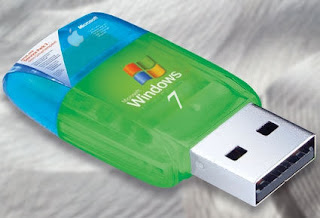
Windows 7 USB DVD Download tool
Windows 7 USB DVD Download tool
INSTALLATION:
TO INSTALL THE WINDOWS 7 USB/DVD DOWNLOAD TOOL
:
:
- Click to open the Windows 7 USB/DVD Download tool installation file.
- When you are prompted to either save the file to disk or run it, choose Run.
- Follow the steps in the setup dialogs. Youll have the option to specify where to install the Windows 7 USB/DVD Download Tool.
NOTE: You need to be an administrator on the computer you are installing the Windows 7 USB/DVD Download tool on. The tool requires the Microsoft .NET Framework version 2.0 or higher.
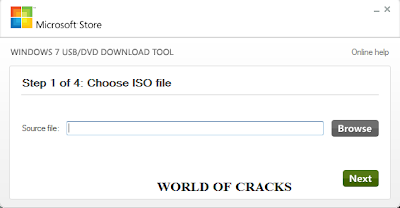
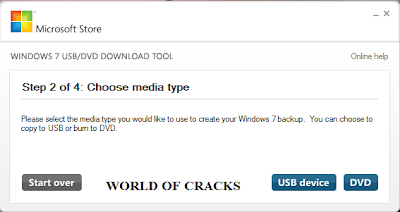
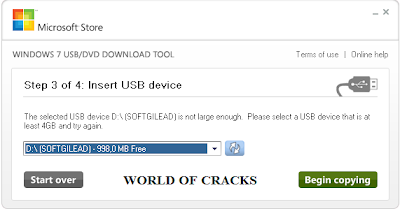
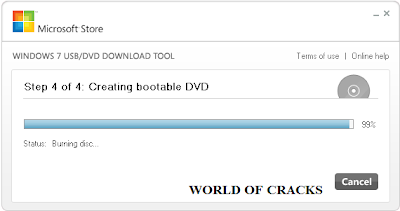
Screenshots:
SYSTEM REQUIREMENTS
- Windows XP SP2, Windows Vista, or Windows 7 (32-bit or 64-bit)
- Pentium 233-megahertz (MHz) processor or faster (300 MHz is recommended)
- 50MB of free space on your hard drive
- DVD-R drive or 4GB removable USB flash drive
USING THE WINDOWS 7 USB/DVD DOWNLOAD TOOL
Before you run the Windows 7 USB/DVD Download Tool, make sure you have the Windows 8 ISO download from Microsoft Store and have downloaded the Windows 8 ISO file to your hard drive.
- Click the Windows START button, and click WINDOWS 7 USB/DVD DOWNLOAD TOOL in the ALL PROGRAMS list to open the Windows 7 USB/DVD Download Tool.
- In the SOURCE FILE box, type the name and path of your Windows 8 ISO file, or click BROWSE and select the file from the OPEN dialog box. Click NEXT.
- Select USB DEVICE to create a copy on a USB flash drive or select DVD disk to create a copy on a DVD disk.
- If you are copying the file to a USB flash drive, select your USB device in the drop-down list and click BEGIN COPYING. If you are copying the file up to a DVD, click BEGIN BURNING.
Go to link Download

Thursday, October 27, 2016
Windows 7 USB DVD download tool direct download link mediafire
Windows 7 USB DVD download tool direct download link mediafire

When you choose to download most software from the Microsoft Store, you have the option of using Download Manager or downloading from your browser. However, when you purchase Microsoft Windows 7 from Microsoft Store, you have an additional choice to make: whether to download a collection of compressed files or to download an ISO file. An ISO file combines all the Windows 7 installation files into a single uncompressed file.
These instructions are for Windows 7 only. If youre looking for instructions about downloading Windows 8, click here.
If you choose to download an ISO file (so that you can create a bootable file from a DVD or USB flash drive), copy your Windows 7 ISO file onto your media and, run the Windows 7 USB/DVD Download Tool. After you do this, you can install Windows 7 onto your computer directly from the USB flash drive or DVD.
NOTE: When you download the ISO file, you must copy the file onto a USB flash drive or a DVD to install Windows 7. When youre ready to install Windows 7, insert the USB flash drive into your USB port or insert your DVD into your DVD drive, and then run Setup.exe from the root folder on the drive.
The advantage to following this process and creating bootable media is that it allows you to install Windows 7 without having to first run an existing operating system on your machine. If you change the boot order of drives in your computers BIOS, you can run the Windows 7 installation directly from your USB flash drive or from a DVD when you first turn your computer on. (Please see the documentation for your computer for information about how to change the BIOS boot order of drives.)
Copies
To install the software, you may make one copy of the ISO file on a disc, USB flash drive, or other media.
After you’ve installed the software and accepted the license terms that accompany the software, those license terms apply to your use of the software. The license terms for Windows 7 permit you to make one copy of the software as a back-up copy for re-installation on the licensed computer. If you do not delete your copy of the ISO file after installing the Windows 7 software, the copy of the ISO file counts as your one back-up copy.
If you need to download the software again, you can go to your Download Purchase History in your Microsoft Store account and access the download there.
Installation
To install the Windows 7 USB/DVD Download tool:
Click to open the Windows 7 USB/DVD Download tool installation file.
When you are prompted to either save the file to disk or run it, choose Run.
Follow the steps in the setup dialogs. Youll have the option to specify where to install the Windows 7 USB/DVD Download Tool.
NOTE: You need to be an administrator on the computer you are installing the Windows 7 USB/DVD Download tool on. The tool requires the Microsoft .NET Framework version 2.0 or higher.
Download Link
Go to link Download
Saturday, October 22, 2016
Windows 7 Ultimate Download Official ISO 32 64 Bit DVD
Windows 7 Ultimate Download Official ISO 32 64 Bit DVD
Windows 7 Ultimate Download Official ISO 32 / 64 Bit DVD
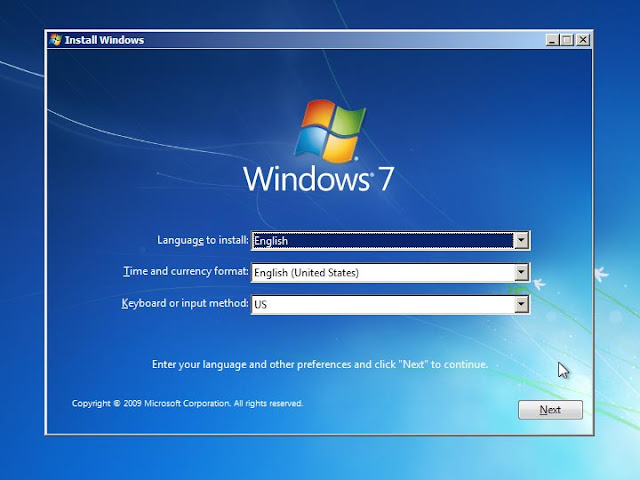
Download Windows 7 All in One ISO if you are interested in multiple editions in single ISO. Desktop navigation is super fast and smooth in windows 7 ultimate version. Windows 7 firewall is more secure with inbound and outbound firewall rules. You can build application on cloud windows 7. You can also uninstall windows 7 to upgrade to latest Windows release. If don’t want to download & install Full Operating System, You can install windows 7 virtual machine. Windows 7 widgets are useful for productivity. There is huge Microsoft tech support for windows 7. You can Download Windows 10 ISO as well which is latest release from Microsoft.
Windows 7 Ultimate Features and Review
Start application faster Swift Internet Explorer with Enhanced Web Connectivity Ease of Network Creation Remote assistance windows 7 is enhanced Complete backup and Recovery Solution, in case you need 3rd party recovery program then try free data recovery software.
To Download original file need to skip 3
Download full Windows 7 Original version 2016
Go to link Download
Tuesday, October 18, 2016
Sunday, October 9, 2016
VSO Convert X to DVD 5 1 Incl Key Register Code
VSO Convert X to DVD 5 1 Incl Key Register Code
Get VSO Convert X to DVD 5.1.0.12 Full Patch + Serial Number - create DVDs and convert video files of most popular formats, advanced tools of converting videos

Download here VSO Convert X to DVD 5.1.0.12 Full Version
Feature Multiple encoding profiles, Shutdown computer when finished Burn on DVD/USB key or store on PCGo to link Download
Subscribe to:
Posts (Atom)