Showing posts with label get. Show all posts
Showing posts with label get. Show all posts
Friday, December 16, 2016
Ways to Get or Drive More And Huge Traffic To Your Blog by rafomac
Ways to Get or Drive More And Huge Traffic To Your Blog by rafomac

We all believe that there are factors that make blogs much better than other Web Pages, including the speed at which blogs are indexed, the ability to submit to blog directories & normal directories, pings and track backs. All these factors helps to drive huge traffic to your blog and give more visibility to blogs and can even get you more Pagerank from google if you can carefully read the factors below.
1. Publish short posts frequently.
Short post are very popular and common among readers, writing and publishing short post will give great visibility to your blog and short posts dont take much time to write. Try to make short post on daily basis.
2. Submit Your Blog To My Yahoo.
When you submit your own RSS to My Yahoo it is automatically indexed by Yahoo and you will have great visibility.
3. Submit to Google’s reader.
When you submit your own blog RSS to Google’s Reader the Google Blog Search will index your site for you and you will also have great visibility.
4. Trade Link.
Contact blog users to exchange link as much as you can it increases link popularity.
5. Ping your posts.
Use ping sites like ping-o-matic. Ping your site each and every time you add a new post.
6. Comment on other blogs.
Do not just leave short comments alone whenever you comment on other blog. Make sure you Leave your link along side with your comments.
7. Submit to directories And submit Rss
Submit your blog to directories such as Blogcatalog and the rest and submit your rss to search engines as many as possible. Directories increase relevance and visibility with Google.
8. Link from your email.
Add a link to your blog in your e-mail signature block.
9. Use Forums.
Forums are one of the best places to go for advice. Go to forums and find problems to solve. Make sure you always leave your blog name.
10. Tag your blog.
Tagging is a new idea that has erupted across the web. Sites like Del.icio.us, Technorati and many others have a social feature that allows you to place your article under keywords or “tags” that everyone interested in that tag can see.
11. Pay For Traffic And Seo.
If you want to boost your site without any stress and you dont even want to submit your blog to any directory yourself, all you need to do is to pay for Taffic, G-boost, Seo and Link building in a good site like Ineedhits
Go to link Download

Tuesday, November 22, 2016
What are you going to get from Apple this year Apples Latest Updates by rafomac
What are you going to get from Apple this year Apples Latest Updates by rafomac
Apple made some huge announcements today. The first of this kind after the keynote legend , Steve Jobs , passed away. Today’s keynote presentations were pretty big for Tim Cook and team at Apple. It signified a major product series launch. It defines the future of Apple in a way. Though I missed the charisma Steve had when he delivered keynotes for the core products, If he was alive, he would’ve proudly told us how he was able to leverage the crucial cash balance to outbalance the most important application in iPhones and iPads, the Maps.
 Apple has introduced a series of new products at the WWDC’12 keynote series , starting off a week of developer presentations and tutorials and so on. Though it was very much costlier than the earlier WWDC’s , the attendance was full .The tickets to WWDC was sold out in hours. This is remarkable considering that the key person who was the reason for seats to get filled is no more in this world. But people certainly believe that Apple is in good hands. And it did pay off, at least this year it did.
So , I will round-up the major announcements made up at the WWDC ,
Key features noted are :
Rightly so , Apple has implemented a lot of cool and useful features into their own version of Maps.
They have added some extras onto this :
Also , it has a 256 GB / 512 GB Flash storage. Apple decided to finally respond to a decade old problem of slow I/O devices. They chucked the magnetic hard drives. And they decided to top it off by removing the optical drive as well. Remember , Apple removed FDD’s from the iMacs , causing it to become obsolete . This will repeat again , I’m sure of that.
So , I will round-up the major announcements made up at the WWDC ,
iOS 6
iOS 6 was almost certainly expected out of this year’s WWDC as it has become a tradition , as Scott Forstall rightly pointed out during his keynote of iOS6, for Apple to release a new version of the OS at WWDC . iOS6 has vastly improved , both feature-wise and usability wise.Key features noted are :
- A more advanced Siri , who can respond to personalized queries about sports , actresses and literally everything under the sun now. Tight integration with feed providers like Rotten Tomatoes for Movies , Yelp for Restaurant ratings and other content providers have enabled this rich functionality addition to Siri.
- Chinese support . To write , to read and to socialize. iOS6 has features for interaction in Mandarin through Haiku , Baidu and other popular Chinese websites.
- Facebook integration . A single sign on ( just like Twitter integration in iOS5 ) , will enable you to update and post from almost all the apps with unlimited combinations to your friends.
- Lost & Found feature lets you display your backup phone number on the lock screen by triggering it through your Mac or another phone number when you lose your phone. The finder can just click on it and call you right away.
- Improved Safari – with native support to Chinese , Unified search bar ( Much like Omnibox
- in Google Chrome ).
- Voice mail shortcuts on the Phone screen – A feature slightly ripped off from Android , I must say. But they have improved on it . As usual !. It now features a temporary whitelisting when a caller calls you ( or nags you ) multiple times, odds are that it will be important.


Maps
This was the most anticipated feature of all. Maybe even more than the iOS6 as a whole. This position taken by Apple seriously threatens the revenue generation of Google and their data collection as well. Apple has decided to part their ways with Google on the Maps , mainly owing to the fact that they didn’t like Google collecting location details of all Apple devices when they themselves had huge amount of applications of it.Rightly so , Apple has implemented a lot of cool and useful features into their own version of Maps.
- Turn by Turn Navigation on most cities. Ofcourse , Siri will be guiding you. Who else do you expect to guide you properly.
- FlyOver – Coolest feature you would ever want in a Maps application, But Google has already managed to do a similar data usage on their new version of Maps last week itself. Flyover takes you through a 3D flyover over select cities , by utilizing the vector models of the cities collected by Apple.


MacBook Pro
While they mostly updated the technical specs alone on their MacBook Air line up, Apple has whipped up a useful and flashy move on the MacBook Pro lineup. For starters , they killed off the 13” and 17” Macbook Pro’s . Then they decided to remodel the entire philosophy behind MacBook, not just the physical form.As a result, We got this :
It’s certainly thinner , sleek and elegantly beautiful. More than the MacBook Air in a certain way. Tightly packed aluminium body with the display crafted into the unibody structure . Only Apple can make a win-win with this kind of innovation.They have added some extras onto this :
- USB 3.0
- Bluetooth 4.0
- Thunderbolt ports
- HDMI
- Nvidia GT 650 M – a welcome addition to the Mac Line-up.
- 8 GB of 1600 MHz DDR3L RAM
- Optical Drive
- Magnetic Hard Disk
- Boring Old Display
- Noisy Fan
Also , it has a 256 GB / 512 GB Flash storage. Apple decided to finally respond to a decade old problem of slow I/O devices. They chucked the magnetic hard drives. And they decided to top it off by removing the optical drive as well. Remember , Apple removed FDD’s from the iMacs , causing it to become obsolete . This will repeat again , I’m sure of that.
Go to link Download
Wednesday, October 19, 2016
Tutorial How To Get Lots of Friend Requests on Facebook 2014
Tutorial How To Get Lots of Friend Requests on Facebook 2014
Hello Everyone!!
Today we are Posting How To Get Lots of Friend Requests on Facebook 2014!

Facebook is the Most Popular Social Networking Website now-a-days.
All the youth uses Facebook Regularly and many people have Thousands of Friends and many have less than that.
Many get Lots of Friend Requests but many get no Friend Requests.
But today we are Posting a Method by which you can get a Lots of Friend Requests.
On the Internet there are many Posts about this Topic but 90% of them are Fake but now we are Going to give you the Method to get lots of Friend Requests on Facebook!
To get Lots of Friend Requests, we need Lots of Email Addresses and with the Help of Email Addresses we can Invite Thousands of People on Facebook and from which 90% will Send you a Friend Request so they can Add you and Accept your Invite.
To get the List of Email Addresses, just Follow the Given Steps.
1.) Go to Mass Add Email Service.
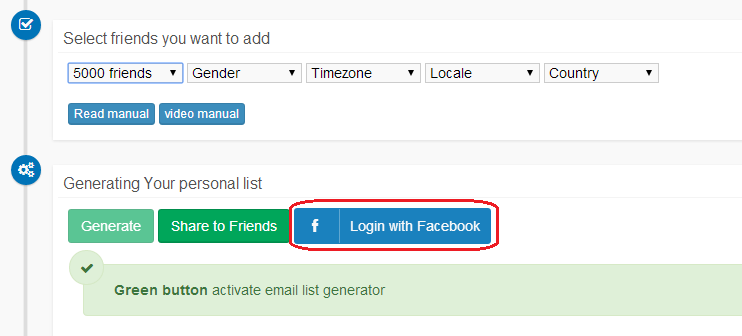
2.) After you go to the Given Site, click on the Button that says "Login with Facebook".
3.) Login with the Account on which you want lots of Friend Requests.
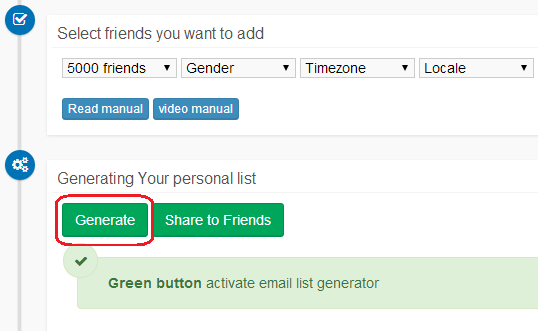
4.) Click "Generate" button.
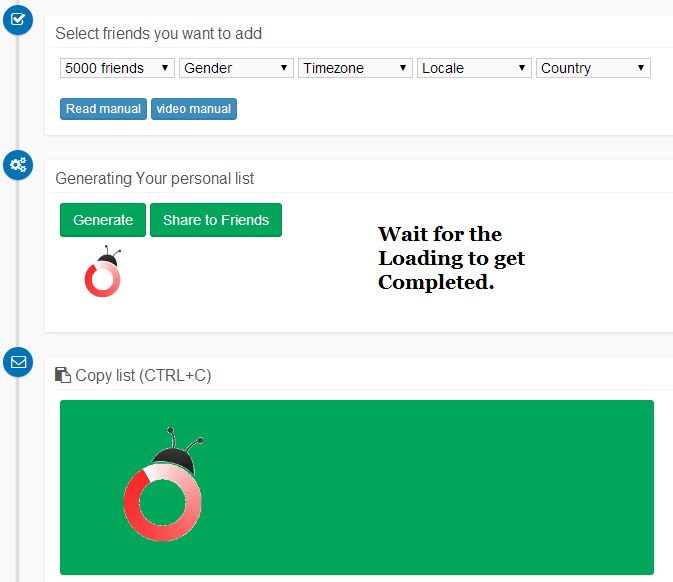
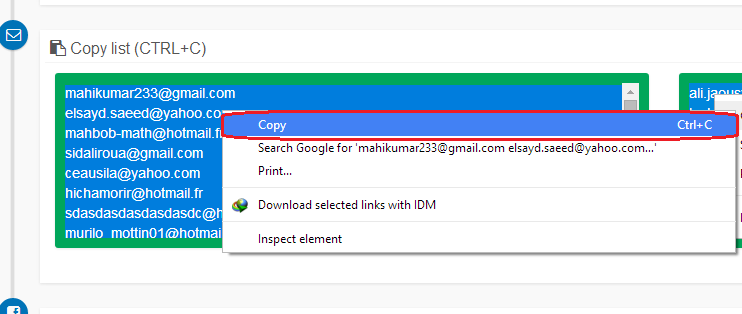
5.) Scroll a bit and you will get the List of Email Addresses. Just copy all the Email Addresses.
Okay that was the Trick to get the List of Email Addresses but the next Step is the Most Important.
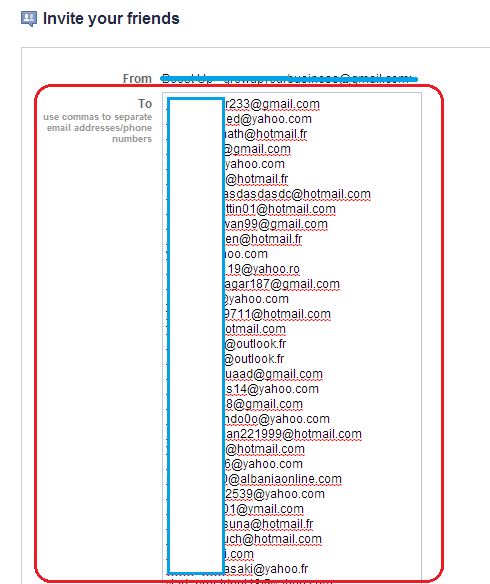
6.) Now go to Facebook Invite Page.
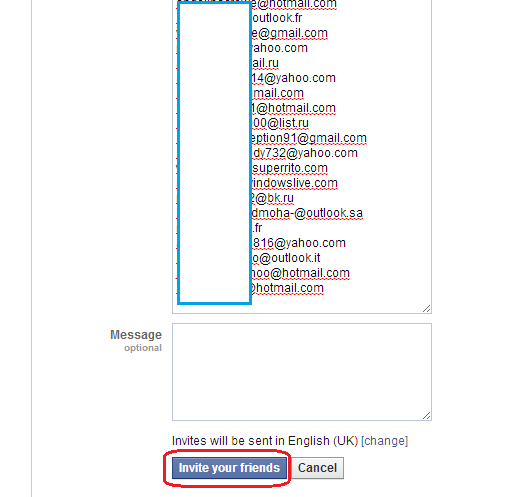
7.) Paste all the Email Addresses in the "To" Field and Leave the Message Box Empty and Click "Invite" Button.
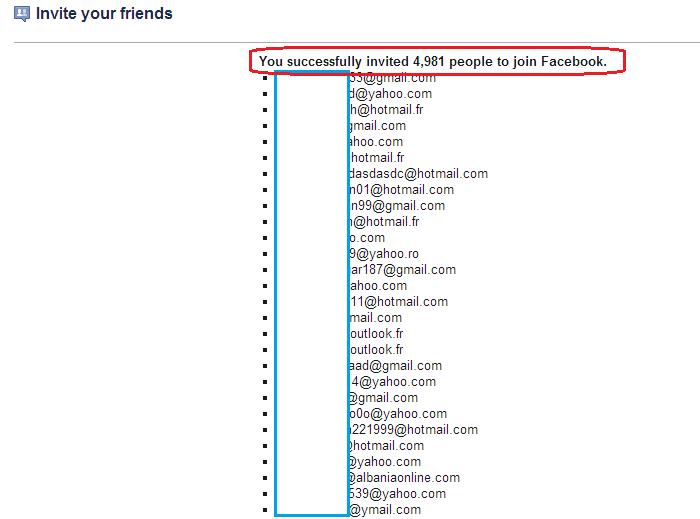
All Done!!
Just wait for Some Time and you will Start Getting lots of Friend Requests.
 Yogesh Jethwani. I am the Admin of YJ ES Latest Buzz. I am Professional Blogger, a Good Programmer, 2-D Game Designer and a Good Person. Check out more about me Here.
Today we are Posting How To Get Lots of Friend Requests on Facebook 2014!
All the youth uses Facebook Regularly and many people have Thousands of Friends and many have less than that.
Many get Lots of Friend Requests but many get no Friend Requests.
But today we are Posting a Method by which you can get a Lots of Friend Requests.
On the Internet there are many Posts about this Topic but 90% of them are Fake but now we are Going to give you the Method to get lots of Friend Requests on Facebook!
How To Use?
To get Lots of Friend Requests, we need Lots of Email Addresses and with the Help of Email Addresses we can Invite Thousands of People on Facebook and from which 90% will Send you a Friend Request so they can Add you and Accept your Invite.
To get the List of Email Addresses, just Follow the Given Steps.
1.) Go to Mass Add Email Service.
2.) After you go to the Given Site, click on the Button that says "Login with Facebook".
3.) Login with the Account on which you want lots of Friend Requests.
4.) Click "Generate" button.
5.) Scroll a bit and you will get the List of Email Addresses. Just copy all the Email Addresses.
Okay that was the Trick to get the List of Email Addresses but the next Step is the Most Important.
6.) Now go to Facebook Invite Page.
7.) Paste all the Email Addresses in the "To" Field and Leave the Message Box Empty and Click "Invite" Button.
All Done!!
Just wait for Some Time and you will Start Getting lots of Friend Requests.
Screenshots
Screenshot 1
Screenshot 2
Screenshot 3
Screenshot 4
Screenshot 5
Screenshot 6
Screenshot 7
If you face any Problems Regarding the Trick, Post a Comment.
Liked this Post, Dont Forget to Like us on Facebook or Join us on Our Facebook Group!!
Tell Others about Us!!
Keep Visiting!!
Posted by
Go to link Download
Subscribe to:
Posts (Atom)