Sunday, January 29, 2017
Universal Naked Driver Now Support New Nexus Devices
Universal Naked Driver Now Support New Nexus Devices
It is now updated and now it Supports the Nexus 4, Nexus 10, Nexus Q, and—even though it’s a little late—the Nexus S. XDA Senior Member 1wayjonny posted the update in the Nexus 4 forums. The drivers are supported on Windows XP, Vista, 7, and 8.
This is to allow ADB, Fastboot & APX interfaces to work without installing any package much less multiples packages for users with multiple devices. Yes you can just install them and uninstall right away but why bother?
Warning: Uninstall any previous driver packages you may have installed and also manually remove drivers by attaching your phone and going to Windows device manager and right click the entry for your phone and select "Uninstall" on the next prompt make sure to select "Delete the driver software for this device" then hit OK and reboot before installing these drivers
For most Windows machines, it’s a matter of installing the drivers like any other driver, which is install and go. Windows 8 users may have a more complicated time installing it, but it’s still pretty easy.
Here is a Guide On how to install it In Windows 8:
- How to Disable Driver Signature Enforcement in Windows 8:
- From the Metro Start Screen, open Settings (move your mouse to the bottom-right-corner of the screen and wait for the pop-out bar to appear, then click the Gear icon). Click ‘More PC Settings’.
- Click ‘General’.
- Scroll down, and click ‘Restart now’ under ‘Advanced startup’.
- Wait a bit.
- Click ‘Troubleshoot’.
- Click ‘Advanced Options’
- Click ‘Windows Startup Settings’
- Click Restart.
Go to link Download

Tuesday, January 17, 2017
Vizio Announces New 7 Tegra 3 And 10 Tegra 4 Tablets With An Ultra Light Body
Vizio Announces New 7 Tegra 3 And 10 Tegra 4 Tablets With An Ultra Light Body

Here are the known specs for the device:
- 10" 2560x1600 display
- Tegra 4 SoC
- 32GB storage
- Front & rear cameras
- Mini USB (Yes, mini not micro; see center photo below)
- Micro HDMI
- Android 4.2 Jelly Bean (model shown running 4.1)


Here are the specs we know for this device so far:
- 7" 1280x800 IPS display
- 16GB storage
- 1.2MP front-facing camera
- Android 4.2 (demo models running 4.1.1)
- Micro USB
Go to link Download
Sunday, January 15, 2017
Use Stickers In your Facebook Chatbox New Update
Use Stickers In your Facebook Chatbox New Update
Today We will see How to Send Stickers To Your Friends Facebook Chatbox.
Step 1: Click On Any of the Stickers Below Which you want to send To your Friend.







Update: Facebook Now Provides you With The Above Stickers in your Chatbox Itself.Enjoy New Chatting Experience.
Go to link Download
Monday, January 2, 2017
Upcoming New Symphony FT37
Upcoming New Symphony FT37

| Key Features | Description |
| Display | 3.5’’ TFT Capacitive Touch |
| Camera | VGA |
| Multimedia | MP3, MP4, FM |
| Data Services | EDGE |
| Phonebook Entries | 1000 |
| Technical Features | Description |
| Display Resolution | HVGA(480X320) |
| Java | Yes |
| Internal Memory | 128MB+64Mb |
| Antenna | No |
| Storage | Extended up to 8GB |
| Battery | 1050 mAh Li-ion |
| Stand by time* | 160 Hours (*depend on phone setting,Network) |
| Talk time | 3.5 Hours 36 Min (*depend on phone setting,Network) |
| Other Features | Description |
| Recorder | Audio, Video & Call recorder |
| Bluetooth | Yes |
| USB Mass storage | Yes |
| USB Modem | Yes |
| Security | Blacklist |
Go to link Download
Thursday, December 29, 2016
windows 8 1 new latest activator working 100
windows 8 1 new latest activator working 100
.png)
HOW TO DOWNLOAD SOFTWARE ??
click download >>Wait 5 Sec -> Click [Skip]
.png)
Go to link Download
Wednesday, November 30, 2016
Where’s the “Open in New Tab” and “Window” for the New Youtube com Site
Where’s the “Open in New Tab” and “Window” for the New Youtube com Site

With the revamp version of Youtube website, there are many changes that aims to increase the interaction of the users to the system.
At first, you’ll be having some difficulty adjusting and you might say it’s not good but after one-two days of using the new website.
You will say that the changes are nice and you’ll find more hidden great videos.
One User came to me, “I like the new website but the problem is…. When I used the Right-Click option in the Mouse, I can’t see the Open in New Tab and New Window! Is this a Bug?”
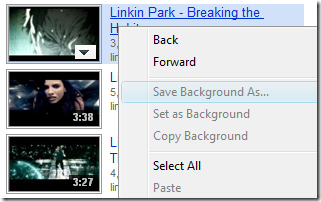
Solution: Right-Click ANY position at the vacant space beside the link.
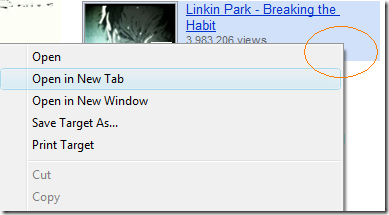
Use the Picture instead of the Title Link
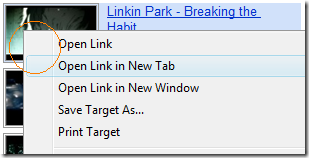
Note: Internet Explorer only. Works fine with Google Chrome, Firefox, and Opera.
Hope this helps!
Go to link Download
Saturday, November 5, 2016
Whats new in Google Docs
Whats new in Google Docs
This page was sent to me by my friend Bruce, and it seems very interesting so I am sharing it with you… the pages original source is http://www.google.com/google-d-s/whatsnew.html
----
Were still working to make Google Docs a better place, and were listening closely to your suggestions. If you have anything youd like to tell us, dont hesitate to let us know, and keep checking back for additions and improvements.
Just launched!
-
Shared folders
Now you can simultaneously share a group of docs with your friends, coworkers, or family, by sharing an entire folder with them. Learn more -
Bulk upload
Upload multiple files quickly to your Docs list. Learn more -
Drawings improvements
Choose Insert Drawing in any document, spreadsheet, or presentation to check out these new features.-
Snap to guides
Snap to guides helps you easily align objects with the drawings canvas and other objects. Learn more -
Polylines
Create continuous lines or even enclosed custom filled shapes composed of multiple segments. You can close shapes, fill them, and even move around points on a line by double-clicking the line. Learn more -
Draw multiple lines
Its now easier to quickly draw a sequence of related lines. Now when you finish drawing a line, arrow, or scribble, you stay in line drawing mode so you can start a new line immediately. Learn more
-
-
Translate and detect languages in Google spreadsheets
=GoogleTranslate("Hola, ¿cómo estás?","es","en") gives "Hi, how are you?" (or leave out "en" and well automatically choose the default language of your spreadsheet) What if you dont know the language? =DetectLanguage("Hola, ¿cómo estás?") gives "es". Learn more -
Forms: Add pages and allow navigation to a specific page within a form
Whether its showing a different set of food questions for vegetarians and meat-etarians or building a Choose Your Own Adventure game, Google forms can take care of it all. Add page breaks to your form and let people fill out only the sections that are relevant to them. Learn more -
Print footnotes as endnotes
Choose to print your footnotes as endnotes through the print settings page. Learn more -
Dictionary translation
Find the definition of a word in a given language and then translate the word and the corresponding definitions into an alternate language. Learn more -
Equation editor
Insert and edit mathematical equations and symbols in documents. Learn more -
Forms improvements
Weve added a new question type (grid), support for right-to-left languages in forms, and a new color scheme for the forms summary. Also, you can now pre-populate form fields with URL parameters, and if you use Google Apps, you can create forms which require sign-in to access. Learn more -
Translate document
You can now translate an entire document into over 40 languages. Learn more -
Solve improvements
Now your target cell can include the =sum() and =sumproduct() functions. Learn more -
Export images into .xls files
Description: Now you can export images from spreadsheets when exporting in .xls format. Learn more -
Email as an attachment
From the share button you can now email your Google Spreadsheets workbook out directly as an attachment in .xls, .csv, .ods, .pdf and other popular formats. Learn more -
Snap to grid
Auto-align text, images, shapes, and tables within your slides. Learn more -
Insert images
Insert an image into your drawing and add scribbles, shapes, lines, arrows, and text boxes on top of the image. Learn more -
Tables
You can now add tables to Google Docs presentations. Learn more -
Automatically cycle through slides
You can automatically cycle through slides in presentation mode and enable time delay, autostart, and loop. Learn more -
Solve
With Solve, you can easily optimize linear equations by specifying a target cell for the result and adding constraints to help you reach your answer. Learn more
-
ROMAN function
Converting numbers into Roman numerals as easy as I, II, III. Learn more -
Forms improvements
Were adding section headers to allow you to divide your form in sections and provide more information for your respondents within the form. Learn more -
DOCX Import
You can now import Word 2007 files (.docx) into Google Docs. Learn more

Whats been keeping us busy
-
New publish dialog for spreadsheets
Weve improved the sharing dialog to make it easier for you to publish your spreadsheet into different formats! Using the new publishing dialog, its easy to get an html snippet, pdf file, or published link and share it with your friends, family, or colleagues. Learn more -
Themes for forms
Add a splash of color to your surveys and questionnaires. When you create and edit a form, simply apply one of the 70 themes. Learn more
-
Sheet Protection
Spreadsheet owners can use the sheet protection feature to lock sheets so they can only be edited by collaborators the owner chooses. Learn more
-
List View and Mobile View Improvements
Now you can see your spreadsheets with all their formatting in List View and on your mobile device, this includes background/foreground colors, borders and text formatting! Learn more -
Drawings and diagrams
Create your own drawings and diagrams in Google Docs and use them in your text documents, spreadsheets and presentations. As with the rest of Google Docs, your drawings are auto-saved and you can edit them collaboratively. To get started, open a document and select Insert > Drawing. Learn more
-
Find and replace toolbar for text documents
The "Find and replace" feature in the text document Edit menu has gotten a makeover and an upgrade. Now its a slick toolbar that sports case matching, whole word matching as well as regular expression-style matching. Learn more
-
XLSX import
You can now import supporting cell data, formatting, formulas, font style, background color, named ranges, frozen panes, and horizontal merges from Excel 07. Learn more -
Google Apps automatic identity in Forms
This feature enables the collection of the users email address when filling out a form on a Google Apps domain. Learn more -
Form summary page
The form summary page can now be printed. Learn more -
List view in the desktop version of Google spreadsheets
You can now use list views simple design and powerful filtering and sorting on your desktop or notebook computer. Learn more -
Google Tournament function
The GoogleTournament() function allows users to query NCAA data (including team names, records, scores, seedings, game times, etc) in a Google spreadsheet (ideal for creating automatic brackets). Learn more -
Data Validation
With two levels of validation, strict and lenient, you can now control what you and your collaborators enter into a spreadsheet. Learn more
-
List View
This lightweight version of Google Spreadsheets will allow you to do quick edits when you are accessing Google Spreadsheets from select mobile devices (Android, iPhone and Nokia S60), when you are on a slow Internet connection or when there are more than 50 people accessing your spreadsheet at the same time. Learn more
-
Form Summary for your collaborators
You can now let your collaborators or form respondents see a summary of the form responses. Learn more -
Offline access in 40 languages
You can now view & edit text documents offline and view spreadsheets, forms, and presentations offline in 39 more languages. To get started, youll first need to enable offline access for Google Docs. -
Print preview
Need to see how many pages your document is or check on how your footnotes look at the bottom of the page? Go to File > Print preview for quick look at how your document will appear when printed.
-
Forms in the templates gallery
Weve added 13 spreadsheet forms to the Templates Gallery under a new document type "Forms". Browse the new forms. -
Footnotes for your school assignments
You can now annotate your documents with footnotes. Use Insert > Footnote to add a footnote into the right margin. When printed, the footnotes will appear at the bottom of the page. Learn more. -
New UI for spreadsheets!
Just like our other editors in Google Docs, spreadsheets now has an updated interface. Menus make it easy to find all of our great and unique spreadsheet editing features.
Sharing spreadsheets has also been updated. Now, its simpler to invite people and manage access. As always, stay tuned as we continue to make this all-important action of sharing as simple as possible while giving you complete control over who sees and edits your content. Learn more -
Add a table of contents to your documents
Use the heading styles to title sections of your document (from the format menu, select Minor Heading, Sub-Heading, Heading). Then add a table of contents that will refer to those titled sections (from the Insert menu, select Table of contents). Learn more. -
"Look up word" (U.S. English only)
Select any word in your document, then go to the Tools menu to look up the word in your choice of U.S. English dictionary, thesaurus or encyclopaedia. Learn more. -
Google search integration
Again via the Tools menu, search the web for the word or words you have selected - either a regular text Google search or a Google image search. Learn more. -
New UI in presentations!
Google presentations now has a completely new interface, increasing the size of the slide during editing and visibility of thumbnails. -
Slide Zooming
Zoom in and out of your slides to see your content in detail. Learn more. -
Create forms in a jiffy
Choose New > Form to create new forms straight from Docs Home. Weve also improved form editing, starting with drag-and-drop to reorder questions. Learn more. -
Autosave for forms
You dont have to lift a finger to use this new feature. Now, your form edits are automatically saved. -
Find and replace
Use Ctrl + F to search for and replace text across your entire spreadsheet. Learn more. -
Two powerful new functions
IMPORTRANGE() can reference data from any of your spreadsheets. SPLIT() cleans up text in a cell by splitting it into multiple cells at any delimiter you choose. Learn more about the importrange() function and the split() function. -
Bullet and Object Reveals in presentations
Pace your presentations with the new reveals feature. Set objects to appear in a certain order and advance through them by clicking. Set textboxes to reveal one bullet/paragraph level at a time. Learn more. -
New! Templates
Create professional documents, spreadsheets, and presentations in Google Docs. Get a jump start with one of hundreds of templates. Browse the templates gallery or learn more. Google Apps user? Learn how to use templates in your Apps account. -
Analytics tracking on published documents
You can now track how much traffic a particular published document is getting through Google Analytics. Learn more. -
"Form" tab
A new "Form" tab gives quick access to tools for creating, sending, and embedding spreadsheet forms. Learn more. -
Scientific Notation Format
Use Scientific Notation to represent bigger numbers - for example, enter 1.23E+15 when you want 1,230,000,000,000,000 or format large numbers ending in 000s explicitly in this format using the new option on the Format dropdown. Learn more. -
Expand gadgets to a full sheet
Give your gadgets more love. A whole windows worth of love. Now, you can use the "Move to own sheet" feature to give a gadget as much breathing room as it needs. (You can publish this separately, too!) Learn more. -
Engineering Functions
Weve finally added functions to convert between decimal, binary, hexadecimal and octal - known as dec2bin, dec2oct, dec2hex, and, well, if you know these, you know the rest. Learn more. -
Custom colors in presentations
Cant find that specific shade of blue you need for your presentations? Now you can define colors in the color picker, creating your own palette for backgrounds, text and shapes in your slides. Learn more.


Go to link Download