Showing posts with label offline. Show all posts
Showing posts with label offline. Show all posts
Monday, January 23, 2017
Windows Live Essentials 2012 Offline Online Installer final Full Direct Link
Windows Live Essentials 2012 Offline Online Installer final Full Direct Link
Go to link Download

Monday, January 16, 2017
Update Anti Virus ClamWin Offline
Update Anti Virus ClamWin Offline
Update Anti Virus ClamWin Offline, ClamWin is an antivirus for Linux called Clamav version of Windows. ClamWin can be used free of charge as well as other program2 on Linux and can run well in a Windows environment. ClamWin Antivirus Pros:
Compared with the other ClamWin very light because it only takes less memory (See comparison antivirus resourse usage in writing "what is a good Anti-Virus?").
Can be integrated with "Windows Explorer" and "Microsoft Outlook".
Update the virus is quite complete. So far able to catch all viruses.
ClamWin Antivirus Disadvantages:
ClamWin does not provide facilities "system auto protect", so every time we plug a removable disk, we must first manually scanned.
Windows does not recognize as an antivirus ClamWin. So the security warning windows will remain active reminder to install an antivirus.
In addition, the virus database updates are not available offline. But with this little trick, ClamWin antivirus can be updated via internet connected computer that is not at all.
How to update antivirus ClamWin offline:
Find a friend or a cafe that uses ClamWin antivirus is - of course that is always up to date virus database or can be downloaded from its website ClamWin virus definitions updates.
Open the antivirus ClamWin. On the menu bar click "Tools - Preferences - File Locations", see locations in the "Virus database folder", therein lies the antivirus databases.
Go to the location, copy the file "daily.cvd" and "main.cvd" from that computer. Default location at "C: Documents and Settings All Users . ClamWin db".
Copy both files to a computer that will be updated antivirus, into a folder whose location can be viewed the same as above.
If you exit the dialog box "confirm file replace", select "yes", then the old file new file will be overwritten.
Done. ClamWin youve become enlightened ... hehehe
* Conclusion: There is a very good freeware and proper to use, there is also the opposite. ClamWin maybe one of them is still pretty decent to wear. Unfortunately ClamWin is also no facility "system auto protect", is quite risky for a beginner. * Personal opinion, you know
Go to link Download
Wednesday, January 11, 2017
update Kaspersky Offline Mode
update Kaspersky Offline Mode
update Kaspersky Offline Mode?? Some time ago there was one blogger friend asked about how to update kaspersky offline. Actually how to update kaspersky offline is not much different from our online kaspersky update, just a different setting its course.
update Kaspersky Offline Mode :
- setting, klick My Update Center.
- in Update source, klick settings.
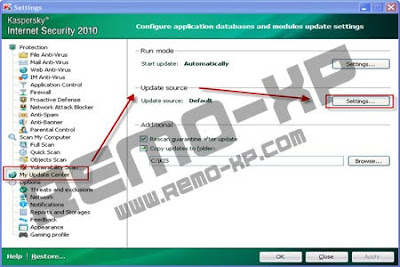
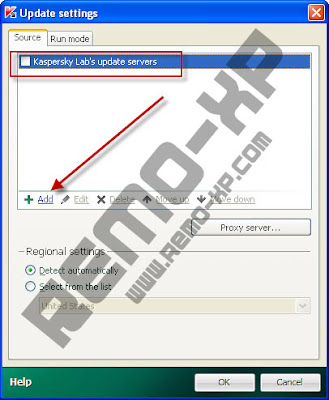
5. Click Add, then specify the location where bloggers save the folder containing the update offline.
7. Back to the dashboard kaspersky, click my update center, and then start an update to start.
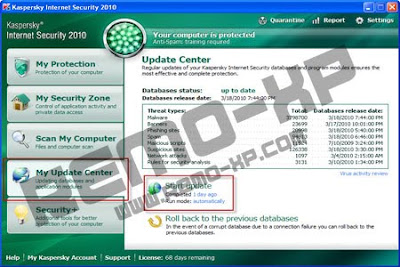
Ready... Nice guys.. tkyu :D
Go to link Download
Wednesday, September 21, 2016
Torch web browser offline installer or Standalone installer Direct download links Torch Full Setup
Torch web browser offline installer or Standalone installer Direct download links Torch Full Setup

Top features of latest Torch browser.
- All in a single and without installing anything
- Its interface may also be similar to the well-known Google browser.
- Torch Browser Inbuilt download free accelerator
- This browser also contains a download accelerator.
Moreover, security systems towards malicious attacks through the net browsing performance along with the browser that gave rise involved with it.

Social networking Sharing made easy:
This is actually the place you may have available the resources that produce an improvement in this browser. The initial tool may be the “Share”, you’ll have the ability to reveal the contents biggest social networking site on the planet with only one click.
It is possible to download the videos you prefer with an individual click.This is actually the place you may have available the resources that produce an improvement in this browser. The initial tool may be the “Share”, you’ll have the ability to reveal the contents biggest social networking site on the planet with only one click.
As though this werent enough, this program also offers a straightforward video player,
You may even pause or cancel the duty,

Secured and safe:
- Protecting you against fighting viruses.
- Being in line with the Chrome code, due to the fact of its integration with the Google internet search engine.
Click Here to Download [71 MB]
Go to link Download
Subscribe to:
Posts (Atom)